
Group visibility - show/hide
Shift-clicking the eye or camera icons for groups in the collection panel will universally show/hide everything within that group, whether or not certain selections within the group were previously hidden. This is fine, but I would like to suggest a simple method to retain selected visible/invisible items within the group instead of universally making ALL items either shown or hidden - which is the ONLY option (that I can tell) currently.
For example, it would be nice to just click the eye icon at the top of a group to show/hide the items in the whole group and retain the individual visibility toggles of each item within that group. If I want to show/hide ALL, the shift-click method is fine.
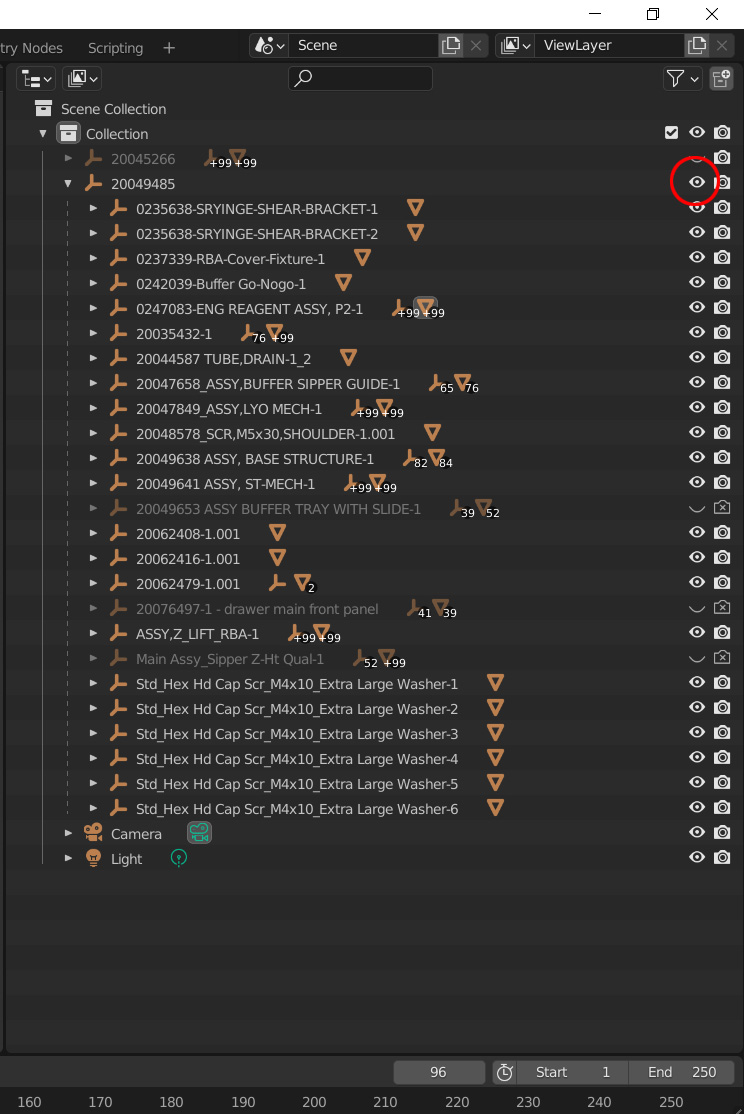
Thus, recommend adding the ability to retain selected shown/hidden items within the group by simply clicking the eye (or camera) icons at the top/head of the group. (Currently, just clicking the eye or camera at the top of a group will do nothing - thus it currently has no function as far as I can tell.) This attached image shows that I have three items within my group that I do not want shown. Yet every time I shift-click the group they are ALL shown/hidden.
Thank you for considering.
2 Comments
There are no "groups" in Blender.
Groups, Collections, whatever it is called. You are correct, though I'm not concerned with semantics for my idea (unless what I described is not understandable?).