
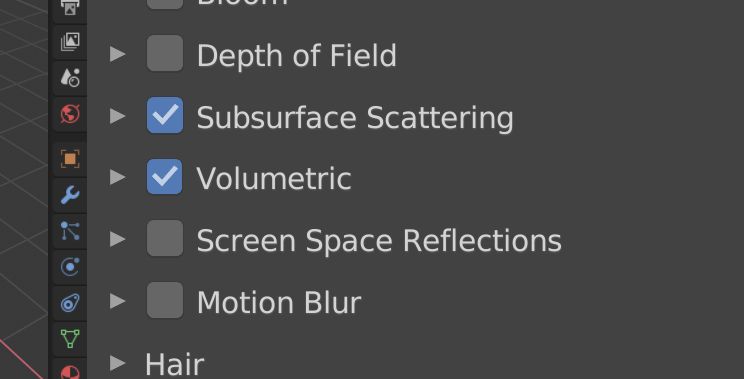
Return the Volumetric Rendering and SSS checkboxes to EEVEE
When there are a lot of objects with SSS materials in the scene, one click on the checkbox makes it possible to fine-tune other materials without additional load on the video card to draw each frame. The same applies to volume objects, fog, etc. One click and you can continue to customize the scene or other materials.
Without these checkboxes, you need have to find all the materials and turn off the nodes in order to see how the scene looks without fog or subsurface scattering.
Or add option to disable the 'Volumetric Render', 'SSS' and the rest of the shading effects to "Simplify Scene" section.
English is not my default language.
9 Comments
Keep in mind that on the near future roadmap Blender will have overrides, all of the recent depsgraph changes that have been added are to support this (among other things)- once this system is fully implemented, it will be trivial to create scene-wide overrides for things like this rather than a million different options people have to hunt down. I agree that in the short term it's kind of a pain for certain people, but it's growing pains that we have to accept to get more streamlined.
I think we should have the checkboxes, but NOT for performance reasons... it's good to be able to toggle the volumetrics to see the effect they have on lighting. It helps art-direct the scene.
oh yes, please, checkboxs should return... at least they can combine the auto toggle of volumetrics and SSS with the checkbox, but removing them it's a mistake, it remains useful for so much people... auto enabling/disabling is not always the easy way, we need manual option to have more control! I don't have the option of disable visibility, Because I want them to STILL seeing! So it goes to removing nodes and the amazing CTRL+Z that goes awful and sometimes crashes all Blender even in powerfull computers. The WORST workflow EVER... I don't want to hide something I'm using, And If I'm not going to use them I don't want to search for all them in a large scene to hide them and then unhide them again. btw depth of field change is good in general
You can directly disabling the object in question or the collection in the outliner with the "exclude" checkbox. But having to enabling volumetric and SSS twice (the node and the menu checkboxes) is not really useful and intuitive
* @Shimoon * Yes I can. But when I have 10 (100) objects with SSS in different collections, it’s not very convenient to search and switch them off every time. The same applies to the volume - to turn off the fog of the World will have to climb into the shader settings of the World and turn off the node.
In addition, there are objects with several materials (diffuse, glass, SSS, Volume Scatter - all in one object).
One click on checkbox saves time.
* @Shimoon * the option to disable the volumes, and the rest of the shading effects could be added in the "simplify scene" section
* @george.mitev * yes plz, that's the perfect place
* @george.mitev * If you don't mind, I will add your proposal to the main post.
* @george.mitev * Winning idea, the best of both.