
Edge Flow View
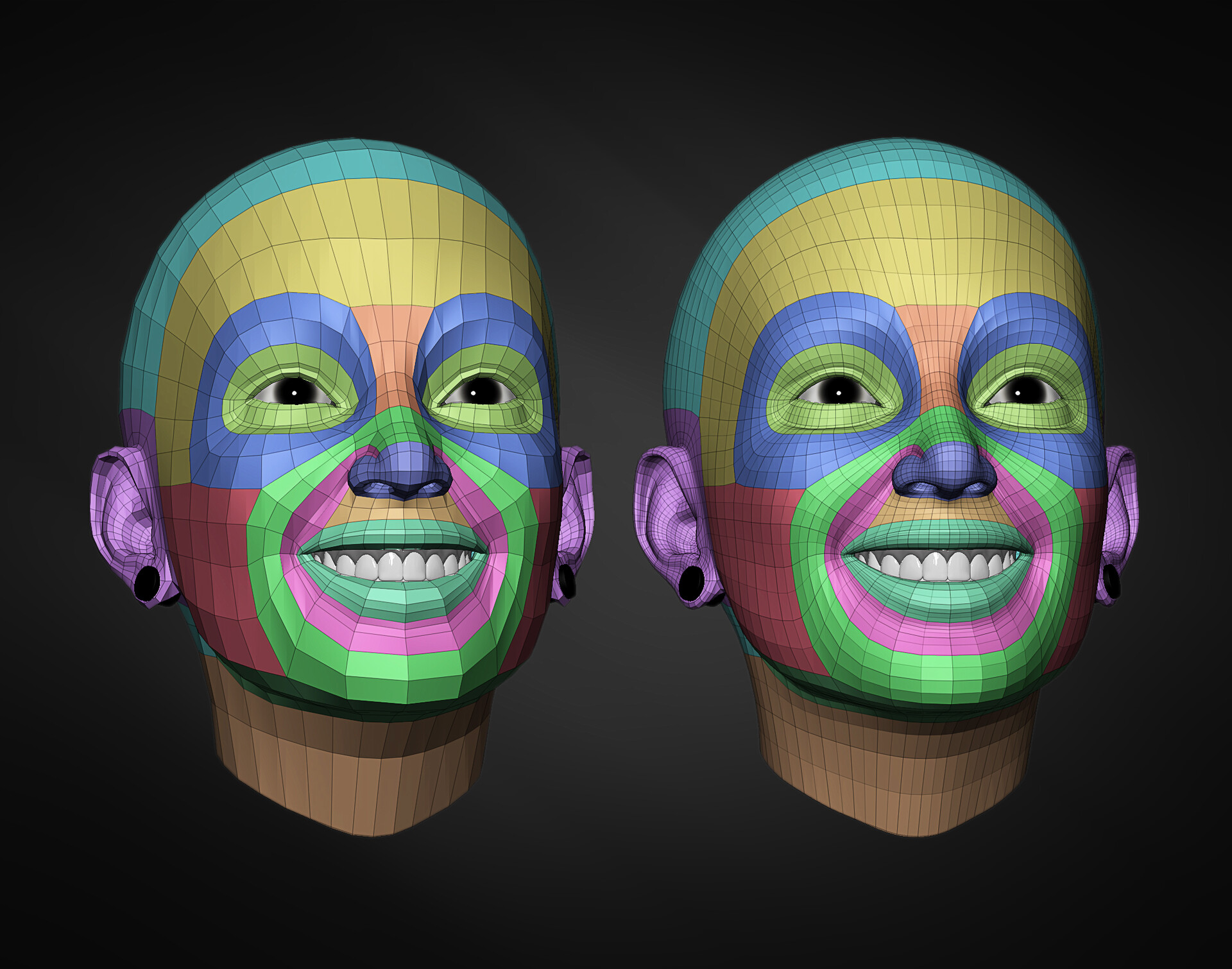
Under Viewport Shading, add the option to [view edge flow] using [randomized colors] that updates in realtime while in edit mode.
I often use the [add edge loop tool] to check the flow of my mesh, using the prediction line it generates, already so why not add a view mode that automates these kinds of analytical checks and balances?
Source of inspiration was Danny Mac 3D's tutorial on retopolization techniques:
Image in the attachment (from Marco Nogueira on Art Station) is an example of what this new view mode would look like.
5 Comments
how could it possibly know which direction the loop is traveling though (short of some AI visual analysis)? looking at your screenshot and ignoring the colors you've already set up, I could find multiple different dominant loop 'paths' that might be highlighted instead.
Pretend you're a computer- how does a computer know the difference between a "cheek" and a forehead? why wouldn't the forehead loop just continue through the cheek and around the bottom of the chin? What's stopping one of the lateral ear loops from continuing all the way into the corner of the mouth? The difference is that you have observed the mesh, and applied human logic and intuition to create those groups. A basic algorithm is not capable of doing that.
It might work somehow I think. It could be not the same what human mind/eyes see/expect to see (because our brain work different, on this head example - yellow colored zone stopped on cheeks for some reasons), but still...
May also has alternative modes when start from shortest closed loops up to longest. Maybe even has some sort of fill mode (fill all polygons from one of loop sides if those polygons not touch any other closed loop) to solve cases like fingertips or so.
Sounds doable, but to make it work with realtime overlay performance it has to be implemented on low level + good multithreading/multitasking. Otherwise such amount of constant for loops through whole mesh would be laggy as shit even on mid poly meshes. Of course - to design in around 5 minutes on words is one thing and to make it work is quite different ))
"but to make it work with realtime overlay performance it has to be implemented on low lefel + good multithreading/multitasking. Otherwise such amount of constant for loops through whole mesh would be laggy as shit even on mid poly meshes."
I don't think it needs to run in realtime...
Manually refreshing the display would probably be the more feasible way to implement such a feature...I would only see it being important to briefly analyze complex edge flows for things like facial topology, on various types of creatures and not just humans, or in skin deformations if you're creating a muscle/bone rig and want to save on performance by manually carving out where everything creases rather than throwing a ton of poly at it...
It has not much sense if it will be not auto refreshable overlay. I don't know. Interesting idea, but how to make it work question not to me... in coding I'm just hobbyist - sitting and working on small python addons for myself.
Automatically? nahh just use the face sets/ make them usable for this kind of work.