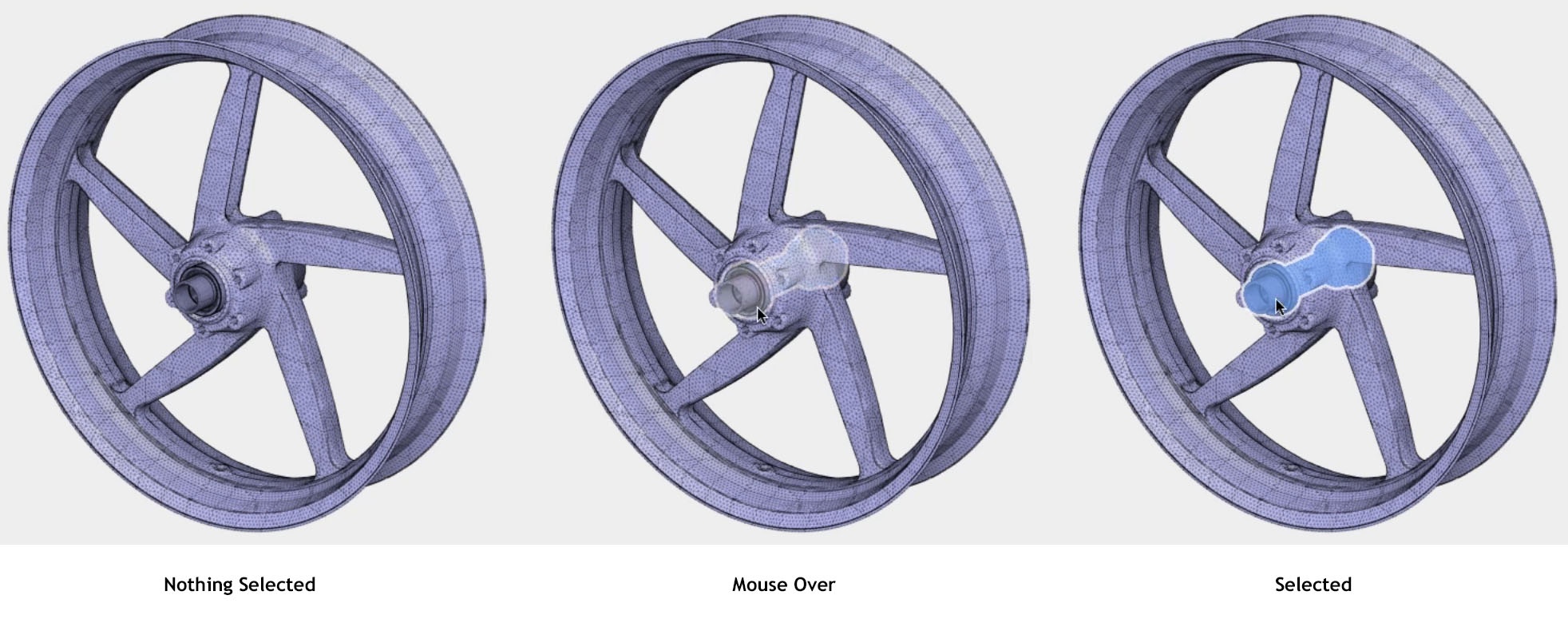
Show selected objects slightly, even if they are hidden beneath others.
Here is a graphic sample
100%
Development Status:
Open
Upvote1Downvote0
a
albertdearias
29 Oct 2017
5 Comments
j
jason
We have this somewhat already with the X-ray checkbox in Object Properties, but I can certainly see the value in it as an option (perhaps in 2.8).
I'm not such a fan of preselection highlighting, though. I've worked with that feature in other applications and, for me, preselection highlights makes my 3D View much to blinky and busy.
1
l
luciano
Yes, though preselection highlight has one upside that blender doesnt have right now, every time you're gonna select something, you select the right thing, and never have to click around or serially click to actually grab the, object, vertex, bone that you are trying to select, so you're 100% accurate at selecting, which is a huge probem in blender.
1
p
post
@Looch just hold ALT when right-clicking over multiple objects
I agree with @Fweeb on automatic preselection highlights would make the viewport very blinky and also in most cases be quite unreliable if, say two or more very similar (or identical) objects are on top of one another - which object would be highlighted?
The preselection highlights could be useful when hovering over assets in the selection menu (selecting using ALT+RMB)
Looks cool, but according to the screenshot, not exactly like this proposal yet. It seems to draw the outline but not the faces with transparency. Also, he says "selections", not "preselections". But who knows, maybe there's more to it.

5 Comments
We have this somewhat already with the X-ray checkbox in Object Properties, but I can certainly see the value in it as an option (perhaps in 2.8).
I'm not such a fan of preselection highlighting, though. I've worked with that feature in other applications and, for me, preselection highlights makes my 3D View much to blinky and busy.
Yes, though preselection highlight has one upside that blender doesnt have right now, every time you're gonna select something, you select the right thing, and never have to click around or serially click to actually grab the, object, vertex, bone that you are trying to select, so you're 100% accurate at selecting, which is a huge probem in blender.
@Looch just hold ALT when right-clicking over multiple objects
I agree with @Fweeb on automatic preselection highlights would make the viewport very blinky and also in most cases be quite unreliable if, say two or more very similar (or identical) objects are on top of one another - which object would be highlighted?
The preselection highlights could be useful when hovering over assets in the selection menu (selecting using ALT+RMB)
Already being added in 2.8: mobile.twitter.com/tonroosendaal/status/843813361427058690
Looks cool, but according to the screenshot, not exactly like this proposal yet. It seems to draw the outline but not the faces with transparency. Also, he says "selections", not "preselections". But who knows, maybe there's more to it.