
Resizable 3D/2D Gizmos.
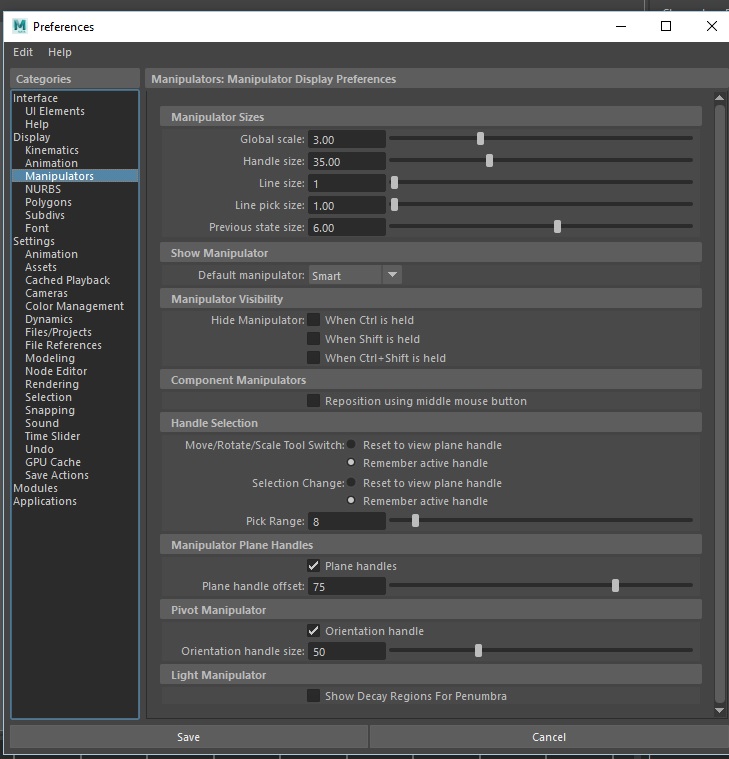
One of the cool features in Maya, is that you can change the Gizmos size on the fly with hotkeys making them easy to use in certain situations where they are hard to grab.

there are also other extra options like line size for the rotate gizmo or handle size.. and much more

Blender has one option in the preferences but it scales them in a uniform way that makes them not that useful, at least not all of them.
 So the proposal is to add those missing features in the preferences with the possibility to assign some of them hotkeys by default.
4 Comments
The thing I like about the maya gismos is that you can resize them on the fly with the -/+ keys also
* @Matthew Cooke * Yes! That's one of the little things that seem so simple but I really miss when I got back in Blender. I do this literally all the time in Maya while animating.
I also would like to ask for an option to change the size of the rotate tool axes like softimage, I miss that software alot and i hope Blender devs can take many little nuggets and bring them to Blender.
softimage.wiki.softimage.com/xsidocs/transforms_TransformationBasics.htm
Hey! I missed Maya's resizeable gizmos so hard when animating, I decided to just make an addon for that.
Check Gizmo Size on my GitHub !
You can also participate on the Blender Artist thread