
IMPROVE THE SMOOTH BRUSH FOR FLAT DYNTOPO SURFACES
To sculpt fabrics with Dyntopo I use solid volumes because with flat surfaces it is impossible, because when sculpt the perimeter wrinkle the mesh due to the automatic triangulation of the faces, and also to soften the contours the mesh retracts a lot. The logical thing would be to sculpt a plane and later to add the modifier "Solidify", but it is not feasible.
I think the problem is in the way that Dyntopo generates new mesh on the borders and how the smoothing brush acts.
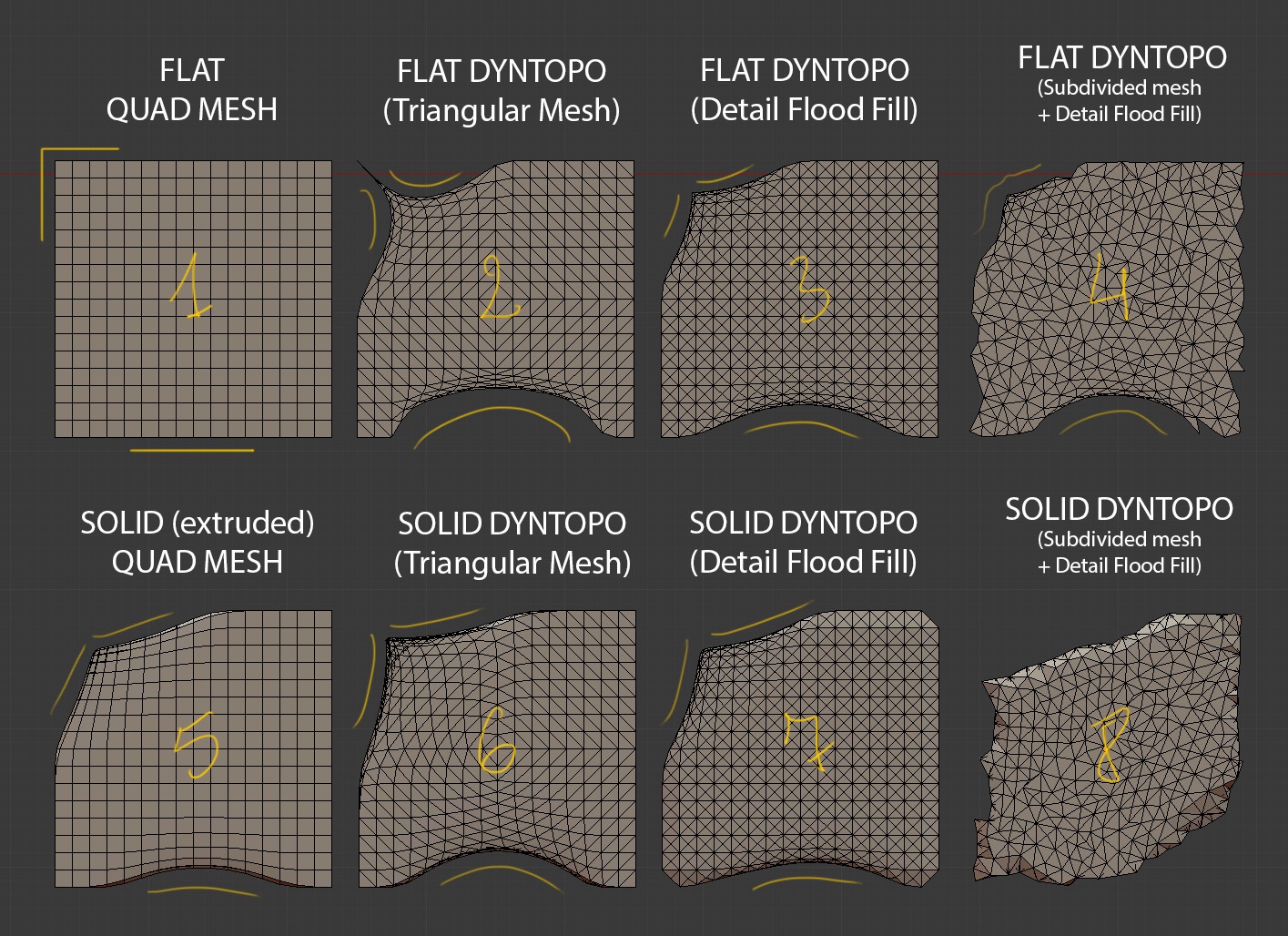
I have done eight tests to see how the smoothing pinzel reacts depending on the shape of the faces and whether the object is solid or not. In seven tests I painted with the brush softened the upper left corner and the basse of frame / cube. In the eighth test "Detail Flood Fill" has destroyed so much the mesh that already I have not softened anything.
I will comment one by one how I have performed each test and the results I have obtained. 1. Original flat mesh with square faces. As expected, the Smooth Brush respects corners and straight edges. The corners and contours vertexs with of two adjacent edges do not retract. 2. Activating Dyntopo and smoothing directly without generating new geometry. The simple fact of triangularizing the mesh makes the Smoothing Brush very corrosive. 3. Activating Dyntopo and running Detail Flood Fill using the same size of the original mesh. It seems that all the triangular faces are split by the half i when painting with the smoothing pinzel the mesh retracts less. 4. In this case I have first subdivided the original mesh and subsequently reduced the mesh with "Detail Flood Fill" With the polygonal reduction the contours are broken and with the smoothing brush the faces are also contracted. 5. Solid with square faces. From the original plane I have extruded the faces a couple of times to obtain a solid. The corners with vertices of three edges are retracted. 6. It is the solid version of example 2. The mesh retracts a lot and the corners are very streched 7. It is the solid version of Example 3. The mesh retracts less and the corners are lost with "Detail Flood Fill. 8. It is the solid version of example 4. The mesh is corrupted because the opposite sides of the volume are not far enough away.
Conclusions: Dyntopo corrodes the perimeter of flat objects. Dyntopo does not work properly on volumes with little thickness. The Smooth Brush conserves the perimeters contour of square faces . The square faces triangulated are smoothed very bad.
Suggestions: Improve automatic triangulation in the perimeter of objects, corners and solids with little thickness. Improve the Smoothing Brush for triangular faces. Add options so that the Smoothing Brush takes into account the direction of the stroke. Let the Ssmoothing Brush respect the "creases" of the mesh and act on them as if they were "Grease Pencil Strokes". That is to say, when smoothing the edges with "crease" ignore the rest of edges without "crease", whereas the edges without "crease" are smoothed normal. Add a method for masking contours, concavities or convexities. Improve the options for saving and restoring masks.
2 Comments
player.vimeo.com/video/223123391 Casually I just saw this video with the novelties of Mode, and the smoothing action includes the options that I have exposed for the smoothing brush.
What if the existing behavior is desired? How might a user go about disabling some of these suggestions?