
Outliner - Default = Collapsed
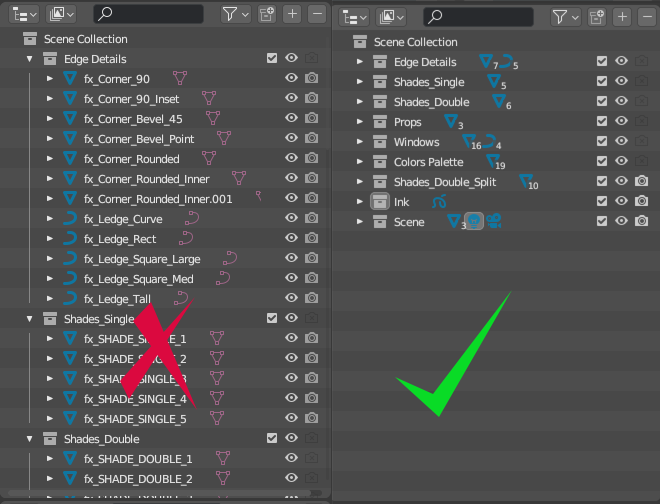
By default, the Outliner expands the full listing whenever a scene is opened... which of course, means it is expanded in every layout.
This is equivalent to an operating system expanding the entire folder structure every time you open a file window.
By default, the listing should be collapsed.
4 Comments
The Outliner preserves the original collapse/expand status.
I don't think the Outliner should expand/collapse arbitrarily, it should keep the status that the user picked. If that's not the case then that's a bug that should be reported.
Hello,
If this is about loading files, perhaps the "Load UI" preference is unchecked in which case the outliner defaults to expanded. I got caught making that mistake live on Blender Today by Mr. Felinto himself.
The phrase "whenever a scene is opened" got me thinking: This is perhaps not about opening a file, but creating/appending a new scene. Indeed, making a full copy of a scene has this effect. Appending a scene does this too whether Load UI is checked or not.
In which case this is an annoyance I share in that Blender is arbitrarily (although in programming, nothing is arbitrary, just unanticipated) choosing not to respect the artist's UI choices made in the scene to be copied/appended even if I check Load UI.
By default, it is expanding if the user is not using the "load UI" preference.
So - by default, it should not be. I've no need to see 10 collections and 100 objects expanded every time I open a file.
"Use the Load/Save UI setting" would not really be a sufficient alternative suggestion, as it's of course globally applied to every file opened. (And yes, it makes sense for the Outliner to remember the status if the user IS loading UI.)
I think this is a bug. Many actions are triggering the opening of the Outliner elements when it shouldn't.
I reported this time ago, it's being investigated (together with a similar bug on ViewLayers selection). projects.blender.org/blender/blender/issues/102317