
Animated Render Settings - Eevee
Hey all!
Blender has the ability to animate pretty much anything, except render settings. To an extent, I can guess this is because it essentially has to lock it down for everything to process and these are generally pretty obviously hard changes, BUT, Eevee is a different system to Cycles and being able to change your sample count makes a VERY big render time difference, but not such a massive visual difference.
Let me explain:
Eevee has different blend methods. The noisiest of these is alpha hashed. In order to get a smooth result, you need to use incredibly high sample counts. You could argue I could use Alpha Blend instead, but it has serious drawbacks. In some cases, yes, but in cases where you need the backface, ambient occlusion, compositing, speed or other shader based effects, it is not a viable option by a long-shot.
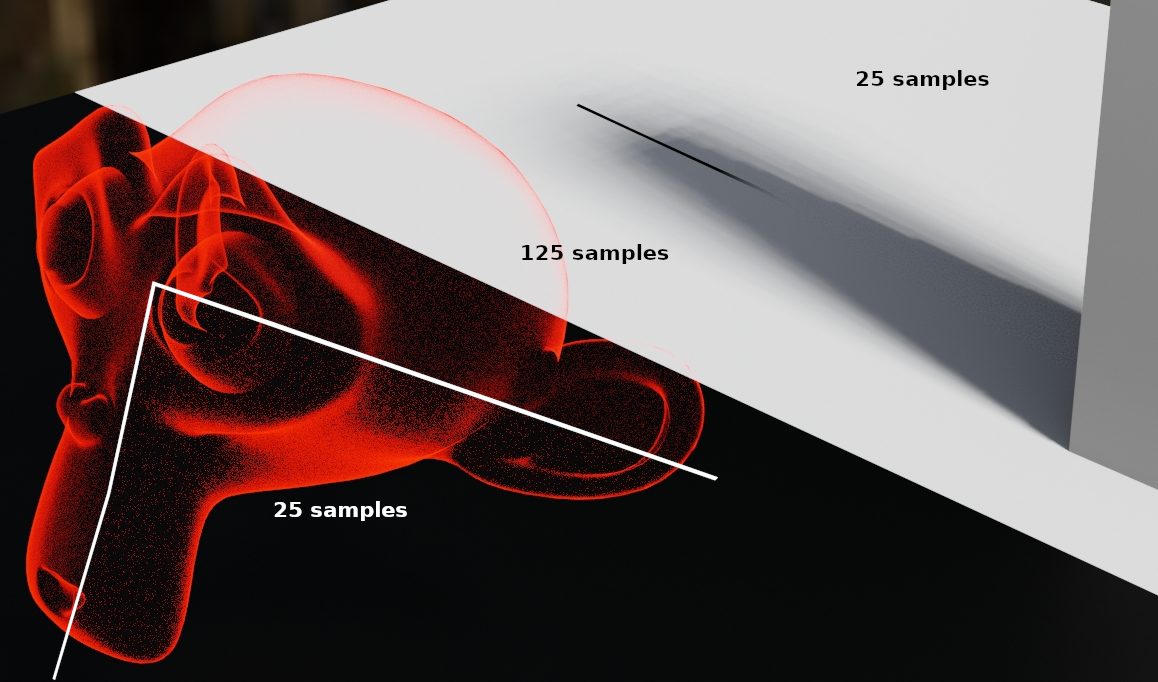
25 samples - 4 sec denoised, 1 sec raw
125 samples - 9 sec denoised, 6 sec raw
Practically, this could be like where you're faking volumetrics and you need:
- excellent transparency
- backfaces and
- compositing
You need that insanely high sample count only for, say, 100 frames out of 2000. Being able to throttle that sample count back down over a few frames will make a HUGE difference in render speed with barely any difference to the render quality overall. A hashed scene needs roughly 120+ samples, but a regular scene, you can get away with 30. That's a HUGE difference in speed, with almost no difference. Smooth shadow quality is the thing that would differ the most.
Not to mention that you don't have to baby the render to change the range and sample count and continue rendering.
The same goes for compositing. I recently had a project where I only needed sparkles over a section of a 1.5min single shot animation. So it required that I split 1 render job into 3, lol.
Being able to keyframe the render settings can make a HUGE difference in render times and allow for some more ambitious renders, because then you'd be able to render a lot faster around those heavier moments!
List of render settings that could be animated:
- Sample count (potentially possible already - not in 3.4 though)
Consider again the above example, where some blending methods/shadows require a lot more samples, while others don't and keyframing can really boost render times when these go out of frame.
- Ambient Occlusion settings
Inside vs outside, sudden light or time transitions.
- Bloom settings
Dream state back to reality or vice versa. Can be done in compositing - faster directly.
- Screenspace Reflection and Refraction settings
Especially thickness and edge fading. Just like for shadows, thickness is a big one when things make contact with reflective surfaces.
- SSS settings
Sample count for individual to crowds
- Motion Blur - especially samples - the leading, centering and trailing won't make a difference tbh...
Something can fly through a scene at a higher speed, requiring more samples, but when it's gone, less can be used again to turn it down. Its something that REALLY slows down a render, even on like 5 or 6 samples.
- Volumetrics settings
I honestly don't know these very well, but I have noticed that some of them can have quite a dramatic effect on the quality of a render for close vs far, like the scale/density distribution over space. Plus again, samples.
- Film - Overscan specifically
Some areas require more overscan than others and bringing more control to it, will also speed up a large section of a render sequence.
- Output Post tick boxes (sequencer and compositor)
Like my previous example. The Sequencer can definitely step in where frames are already rendered, but can be very useful as a quick compositor for added elements like text/images that are static or only need simple animation, like lower thirds. Things like glares and other specific compositing effects also only last for sections of a sequence.
List of things NOT to animate:
- DOF settings
- Shadows
- Color Management
- Simplify (most of these can be dealt with at object/physics level)
- Indirect Lighting (already bakes)
The rest are over the top and really not needed, like keyframing when something will render to black and white vs color. Not that I'd mind that, but generally you're whole render is grayscale or it's not, so yeah, LOL, probably never use it, hehe.
Advantages
- Control over render quality over time
- Much faster render speeds over longer shots
- Less wasted time monitoring rendering
- Reduced cost to render farms
- Makes atmospheric/time shifting animations a much more attractive option as compositing can be reduced in favor of animatable ViewPort effects.
- Denoising tends to destroy fine detail, like water at a distance and can sometimes double render time, so not an option. Keyframing will ensure bypassing the compositor.
Drawbacks
End-user:
- Might need to re-render things until you can predict the result accurately; learning curve
Devs:
- Possibly quite difficult to implement as these are core functions, and can affect other things.
- There is A LOT of render properties that cannot be animated yet, so this is by no means a small project. Probably best for Eevee Next, instead of classic Eevee.
PS, I did look at AnimAll, but it only works for object based animation...
Give this a thumbs up if you agree - share it far and wide! Feel free to share why, if you disagree.
4 Comments
The eevee render samples are already animatable. archive.blender.org/developer/D16827 Other can be added on a per panel basis See archive.blender.org/developer/T103161 for details.
This is really easy and anyone with some code understanding could add them as they are one-liners. So any contributor who wants can pick up the task!
Then it's fairly new - I'm glad!! Whoohoo!! I'm using 3.4 still (production environment and other people can't move up yet).
Would love to - can't (-_-) ... I do contribute in other ways though! Once I can, I'd love to help and code these! EEECK!! :D blendswap.com/profile/1415265/blends
Thanx for all your comments and taking the time!!
You can keyframe eevee render samples though? It is not clear to me what is it you want to be keyframeable
Nope, you can't (unless you have a special add-on for it?). Which is one of the major things I want to be able to keyframe. Other things include pretty much everything except output settings like resolution and framerate. Will make a full list and add it for sure! Thanx for commenting! I didn't think it was needed, but I agree, "render settings" is perhaps too broad. :D