
Asset Browser - One file per library
At the moment, the hierarchy of the resource (asset) library is very complex and requires preparatory work outside of the Blender program: you need to create folders in the File Manager, then you need to create a resource file in Blender and fill it with content, and only then create the structure hierarchy. This is no good. It is much more convenient and logical to make one file for each library, as was done in the Cinema 4D program up to version 25. What we end up with:
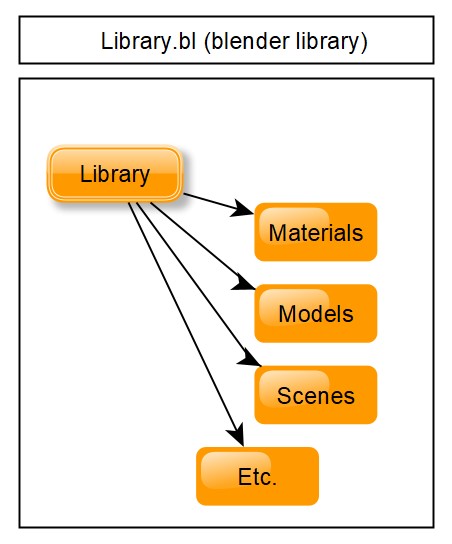
- The entire library with all folders and subfolders, all conceivable resources that Blender supports, will be stored in one file. There will be no need to create a hierarchy in the File Manager, because... all this will be stored and processed in one file.
- Portability. It is enough to transfer to another user, or simply write to a flash drive or to another location on the disk, one file, and not a bunch of files and folders.
- Ease of creating your own library in Blender itself, and working with this library.
- You can create as many libraries as you want, and all this inside Blender - fast and convenient!
6 Comments
I can agree with the critique from L0Lock. But I am trying to build my first Asset library and found , that Blender does indeed not create a library in the library folder, but keeps it local to the workfile. I would like Blender to automatically create an asset file in the main assetfolder which you could use in a different project. As I understan the Assetlibrary at the moment, you would have to create an asset file specifically inside the asset main folder outside of blender to have a clean access to it in later projects.
Example to prevent missunderstandings: I create an project "golfing" with golfballs. I mark a golfball as asset. Now I can use the asset within the project. Blender does not save the asset to the local Asset library.
Next I want to create a childrens bedroom and put golfball asset on the floor. Golfball is not to be found in Asset library because it stayed locally within project "golfing". I wish blender would have created an file with only the golfball inside the local Asset library.
tldr blender should automatically create clean asset files inside the local asset library folder.
Also you should be able to doubleclick asset to open the asset by itself to manipulate it. Similar to Unreal Engine
Thank you for reading.
It sounds like you're describing the Catalog system, which already exists in Blender.
I'm currently assembling my first big Asset Library, and I'm doing it exactly as you described:
All work with the asset library in Blender (a video about which I watched on the Internet, as well as in the Blender documentation) involves first working in the file manager outside the program. What you described is a good option, but I can't do it. I would love to see a tutorial on this topic from you!
I don't think the "things you need to do" that you described are accurate, at least they sound odd to me. All you have to do is mark a data-block as asset and save anywhere in the library folder, or just use the asset from the current file. Everything else is at your own discretion, not required. You can create multiple libraries, folders, catalogs, files... But you don't have to. As you wish.
Having everything in one file doesn't have the effects you describe, it's not easier to transfer, nor to categorize assets. It looks like you expect other things to happen, like all the data-types to be saved in respective categories automatically?
Not a big fan of automatic data-type sorting personally, I don't save everything like this systematically, and I'm not the only one. A common example is animations, poses and rigs : all studios I have worked have very different ways to classify these, sometimes changing across projects or even characters and sequence/shots because of specific needs, and so do I.
Also, while having everything in one big file is possible, I have to say that it has quite some huge drawbacks:
Portability
Any consequent library will be one huge file to transfer, even for a little update. If someone need just a material (literally a few KB, or MB with textures), they need to download an entire library (I've worked on projects with PB of library just for one project).
You can't just download the bits you want. You can't parallelize parts to download for faster transfer. You can't read and write only the bits you need.
If your library is big enough (like any production library), there is a point where you technically can't have everything in one file. It's just too big to read and write, you lose too much time waiting for things to happen even locally, servers flat out refuse to even handle such a big file.
Compared to a fragmented library: you only transfer and update what you need. If what you need is several files, you can parallelize them to optimize the network usage and RW speeds. It's like the difference between buying a tire or a whole new car when you really just needed a tire.
Data safety
Files can break. Just get a power outage, a crash, a storage error, a sync error, someone accidentally press the delete button, and the file is corrupted or lost.
If all your library is in one file, you lose all your library very easily.
You also can't do versioning easily. Any production library keeps a history for assets, so that you can go back in time if needed, use it as backup if you somehow lost the latest version, see what happened back in time to understand why the asset is how it is today, ...
This is affordable with a per-asset fragmentation, not with everything in one huge file.
Most likely you did not understand what I meant. Libraries do not have to be huge; you can create whatever size and content you want. For example, Cinema 4D has standard libraries that can be downloaded through the update window in the program. Yes, they take up several gigabytes each, but...
Materials: why completely transfer one large file with all the materials, when you can create your own small library and distribute it as you wish, and then (if you wish) merge it with your library. For example, I have one file in Cinema: real_materials. It occupies 24 megabytes and consists of a folder structure. For example, Folder01, Folder02, etc. Each folder has its own materials. This is one file, and it is much better than some kind of tree structure of real folders and files!!!
Portability: why are you talking about a huge library again? Why do you need this? You create a small library with updates, pass it on to the whole team, then the team installs this library and combines it with an existing large one. Besides, why save all the work in one huge library??? It's easier to break the work into smaller pieces and share them without any cloud implications.
Saving data: yes, it is possible to lose the entire library in one file, I agree here, but you forget about saving backup copies (don't say that you don't do this with regular files), and about the fact that deleting the main Blender library file (. blend) will disrupt the entire structure of the library and restoring it will be even more fun. Especially if some data is also deleted along with this file, for example, a scene, materials or collections.
I understand that it is difficult for you to understand what I am saying here, because... you haven't worked in Cinema 4D.
To understand a proposal
I don't think there are many developers at the Blender Fundation that have work experience with C4D, and people within the Blender community have many varied experiences with Blender and other softwares, professionally or not.
If I wanted to make a feature proposal that gets Blender's developers to work on, I would do everything I can to make the proposal fully comprehensible by itself with no requirements:
One file with folders
Try to make one blend file with any materials you want, mark them as assets so that they appear in the Asset Browser. Now create catalogs in the asset browser and place the assets in them as you wish. Save the file. This gives you one file with catalogs of materials. Isn't that the same result?
If not, please explain what is missing.
Handling assets
I reckon what you imply in terms of features to be able to do that is:
This is indeed unsupported. With this addon , you can "export" any supported data block into a blend and send it. And you can append that file's data into your library. I wish this didn't require an addon though. But I think it's already planned for the future.
What we really lack is being able to manage assets from the asset browser and without opening the asset's file. Right now, this requires to open the asset's file and then edit it from there. Which is cumbersome and redundant, and could be simplified at least for some simple tasks like changing metadata, merging, cataloging, ...
When it comes to merging assets from multiple files into a new file, or update an asset by importing a new one, there we don't have tools to automate that.
If that's what you miss, you could edit your proposal to orient it to that, and detail how it would work.