
Reconcile menus with associated context menus
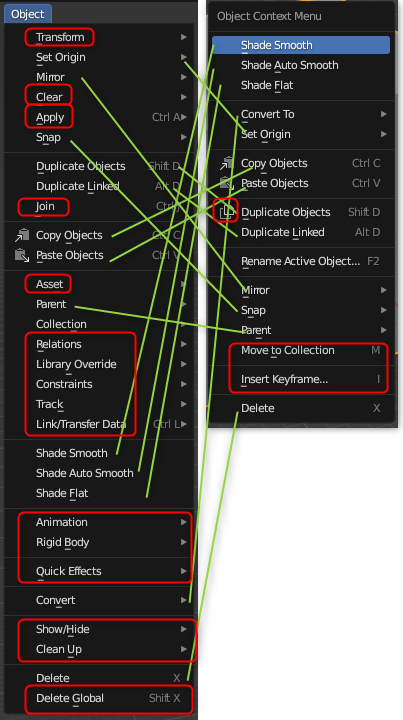
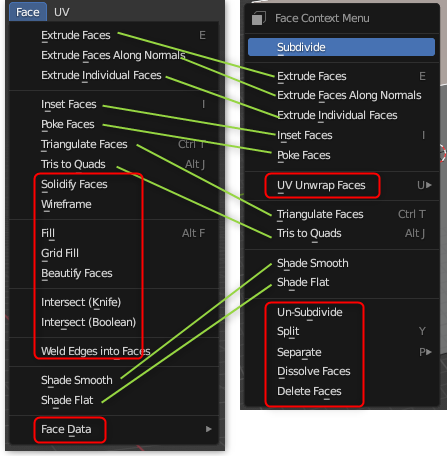
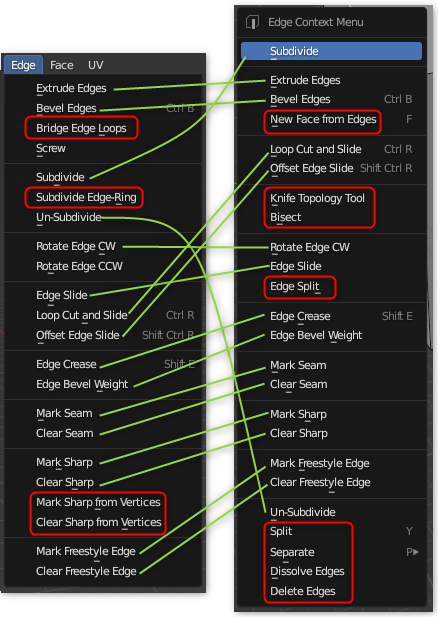
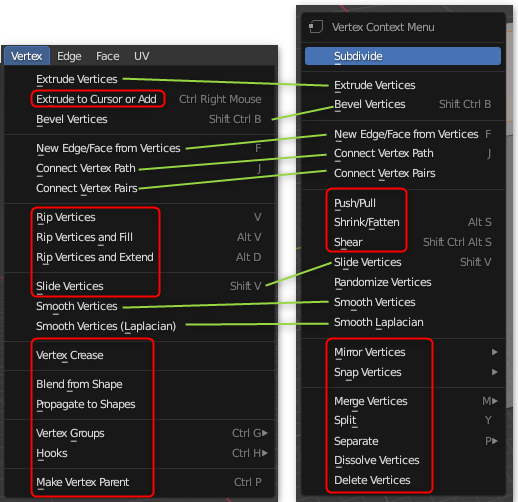
Some menus (object, face, edge, vertex, etc.) have associated context-menus.
I think it's confusing that:
- Some commands are in one, some in the other, and some in both. No way to guess which to check first.
- Items can be in a different order.
- Items can have an icon in one but not the other.
I suggest that when there's a menu/context-menu pair:
- The context menu contains a subset of the menu (the most common commands). The menu has all commands from both.
- Context menu should be in the same order as its menu, including divider lines. Maybe not including menu nesting, since context menu should be quick/simple.
- Icons should match between the two.
Here are some of the differences:
2 Comments
i don't think the point of the context menu is to duplicate the area menu 1:1, otherwise there wouldn't be two completely different menu panel classes for these, if that were the case
VIEW3D_MT_edit_mesh_context_menuwould just call the draw() method fromVIEW3D_MT_edit_mesh_verticeswhen in vertex mode instead of manually rebuilding the layout in that class.Context menus are meant to carry the few things that you are most likely to use in the context.
Editor menus are meant to bring everything that exists in the editor.
Unless you want massive context menus that easily overflow the screen or have infinite submenus and whose only difference with editor menus is being under your mouse cursor, context menus should not be copies of editor menus.
Now having some cleanup work such as making sure icons are the same between identical items, yeah sure.