
Timeline: Option to stop Playback at Markers
I've recently been looking into using Blender as a presentation tool. Soon I came to the conclusion, that the most simple thing to mark a "slide" would be a marker on the Timeline. So I wrote a little Add-on that makes the animation playback stop every time it hits a marker. (You can find the add-on here: reddit.com/r/blender/comments/7df5ud/i_made_an_addon_that_stops_the_playback_when_it/ ) The feedback I got from people was very positive, as this was a much simpler solution than using the game engine for a similar effect and it produced impressing (to non-blenderheads) results for a presentation. I am sure that at least one of my colleagues would look into using Blender for a presentation. If you set the shortcuts to play the animation forwards and backwards to PgDn and PgUp, you can even control this with a Logitech Presenter. Pretty cool, right?
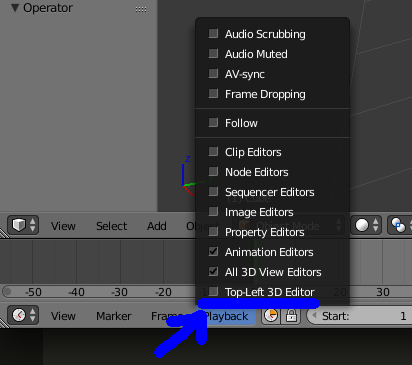
It would be very nice to have this functionality built-in with Blender. My suggestion is to put a checkbox for this in the Playback menu of the Timeline as shown in the thumbnail.
As it is a very small and easy-to-do functionality, I hope the chances to see this being implemented are pretty good. Please share your thoughts!
9 Comments
niiice, wherent you at bcon? we were talking with a few fellow blennderheads about exactly this!
@Luciano Muñoz: No I actually wasn't there! But I'm glad I'm not the only one that wants this :)
[ignore me, can't read :) can't delete comment either...]
This is a pretty clever solution, but I kind of think it's best suited where you have it already: as an add-on. It might even by nice to add additional features, like looping between markers (for looping backgrounds on presentations).
But since the use case is so specific and somewhat out of the normal use of Blender, I personally think it would be odd if the functionality of this add-on were built directly into Blender as general behavior.
@Jason van Gumster: I think this could also be useful for normal video editing or animation. For example, if you want to go to the next marker but would like to see what happens in between. A lot of editing programs I've used (e.g. Audacity) have a comparable feature built in, where you can select a certain time frame you want to play, so that's why I think this is a common use-case. There is already a button that jumps to the next marker, so maybe this functionality could also be added to the Marker menu as something like "Play to next Marker". Thank you for your thoughts :D
@hans chnuspi: I get you. Though, playing devil's advocate a bit, wouldn't this be redundant behavior considering the fact that we can set a playback preview range (it's the clock-looking icon to the right of the Playback menu in your image)?
@Jason van Gumster: Oh wow I didn't know about that :D I guess that's one use-case less :( hahha.
What has this been left without attention? Seems a pretty simple feature with lots of potential use cases? Also would be nice to include option to play untill marker with a specific name?
This is a great feature, imagine using this with Grease Pencil and the Build modifier, to make Whiteboard presentations also. I don't see any very useful functionality for markers anyway, and that Jump to Next marker is not as useful as a Play to Next Marker option could be. I think this should be part of blender. But in the meanwhile I tried to download the Addon, but I noticed that your post in Reddit seems to be deleted, where can I get this addon, please?
Thanks.