
Animation: Offset poses transforms on selected keyframes simultaneously
I want to talk about a critical tool for animation that is seriously needed (or if I just missed it please tell me !).
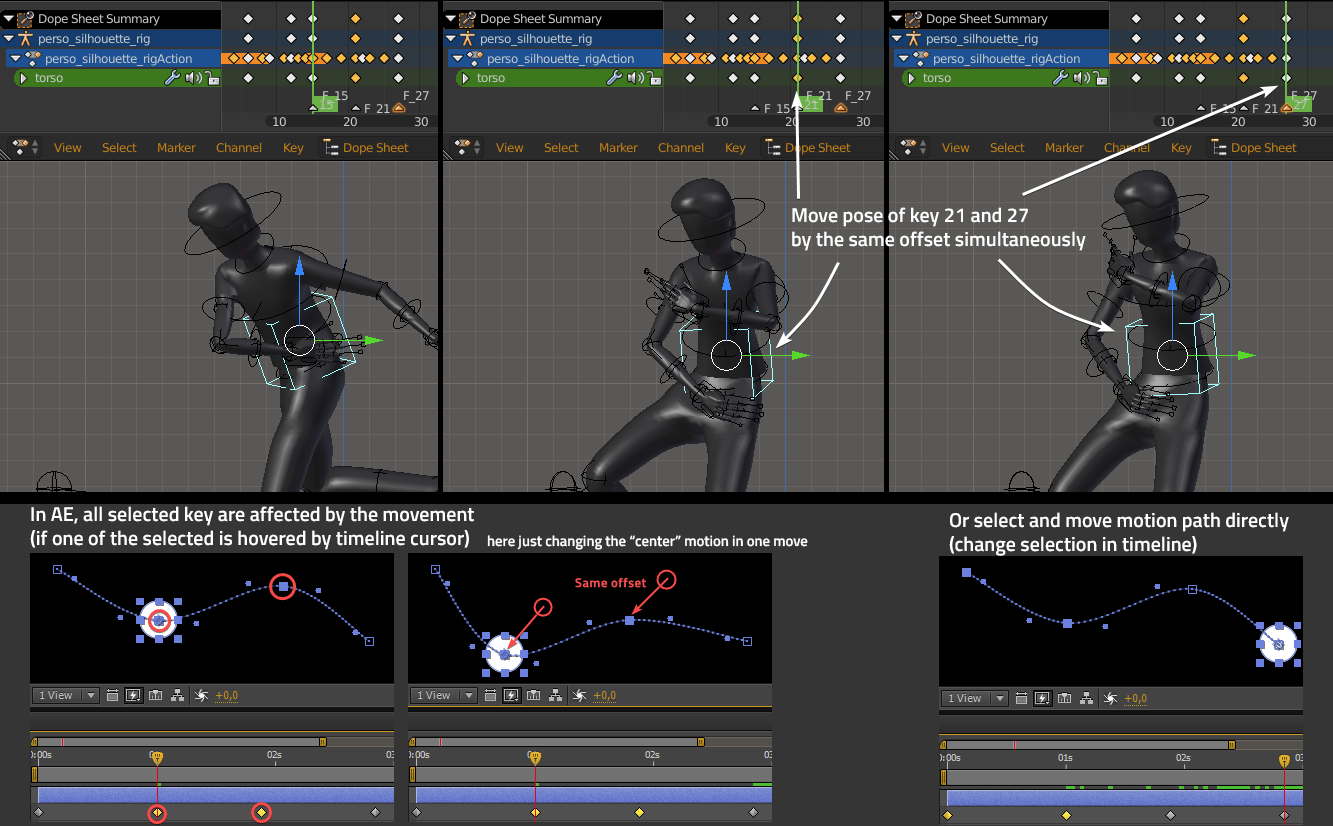
Of all my proposal so far if I have to choose one thing it's this : Being able to offset multiple keyframes transforms (pose) in viewport at the same time !
Usually all I hear is "modify your curve in the graph editor". It's true that sometimes, if you are lucky enough, one local axis is aligned with the movement you need and you can change all the values of desired keys in graph. But most of the times you have a minimum complex movement that involve more than one curve and not aligned at all... The offset becoming really hard to achieve by tweaking F-curves.
The only (long and repetitive) workaround I found is :
- Activate auto-key
- Make my pose adjustement on a key
- Then go from key to key and hit shift+R for each one to repeat my movement.
To be clear, I'm talking about moving
different
keys poses. The propagate pose tool for example only affect
same
next keys (or overwrite them to the same pose).
It might be used in parallel of this
multi-offset move
, which make the sauce even better.
Example time : In the screenshot with the character I wanted to move the torso forward by the same offset on the two last keys. These key hold different transforms (I cannot use the propagate tool), the local axis aren't align with my movement (really hard to adjust in graph editor) so I need to use my dirty trick of "repeat last"(shift+R)... Here it's only for two keys, but I've already done that on more than 30 !
I added screenshots of how it's done in After effects were you have two method:
-1- You can select multiple key in timeline, let your timeline cursor aligned on one of the selected key (this is important, otherwise it doesn't affect the selection and do the modification only on current frame, that's kind of how you choose what to influence). When you move in viewport (or adjust value in the transform field), all keys will get the offset change !
-2- You can directly select multiple "visual gyzmo key"(square) on the viewport object's motion path and offset them.
I fully unsderstand that in our case we can only
show
the motion path and not select it in viewport, but still, we badly need a way to offset a selection of keys to correct whole parts of motions.
Maybe like the method -1- of AE.
Or an operator like propagate, that we can trigger after the change on one key... The best would be to go on dope/graph just for handling keys selections and do the rest in the viewport...
Blender animators of all nations, rise, comment and upvote ! ;)
0 Comments