
Better Indication whether Compositor Node Tree is in Use or not.
To summarize: Dim the compositor Node Tree when the scene is actually not using it? or other better indications about tree usage in render.
Background: In the past, Compositor has an explicit option of "Use Nodes"
Therefore when reading the node tree you can get an immediate idea whether this tree is actually in use or not.
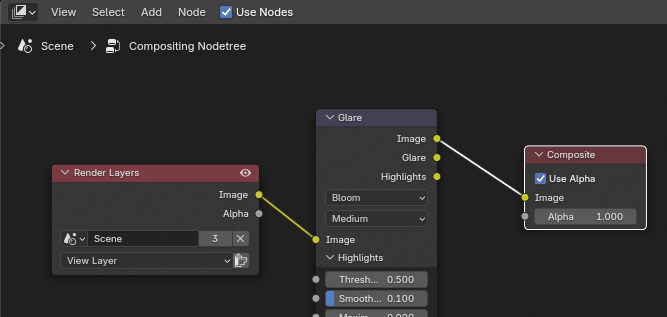
However since the change to remove the button and using "Post processing-pipeline etc" instead.
it's quite hidden and not easily accessible to users. Users may not easily get the idea whether the compositor node tree is used or not.
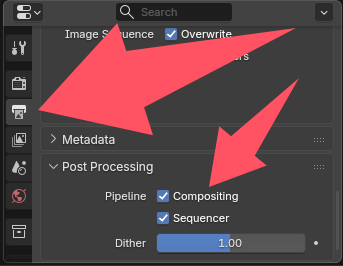
When talking about shader nodes or geometry nodes. object is holding the material, or the modifier has its clear button indicating its visibility.
None of these are available for compositor node tree. When you go to compositor node tree, you just see a tree which may be filled or not. However it doesn't mean the render actually uses it.
therefore, to summarize: I hope the node tree can be dimmed or having other indications for the usage(?). Also perhaps make the post processing pipeline somehow more accessible for both control and indication.
Occupying quick favorite is the current workaround for me. but along with the options to enable viewport compositor, etc.
I feel compositor is already taking lots of real-estate of my quick favorite. I hope they can be improved more.
1 Comment
Currently, deactivating Compositing in the Output properties is decoupled from the Viewport compositor, so an indication in the node editor would be misleading.
We're planning to move towards a layered compositing workflow where a scene can have compositing modifiers that you could assign to a scene, just like you would assign modifiers to an object. Hopefully that makes things clearer.