
Add missing parenting operations
This idea comes after a Twitter discussion about how hierarchies can be modified and extended in Maya and trying to accommodate that workflow in Blender.
One of the things that came out of it was that Blender is lacking a way to quickly parent a selection of objects to a new empty. This is what Maya calls "grouping" and is common in the workflow of many.
In Blender we would need to manually add a new empty to the center of the scene and then parent the objects to the empty.
This doesn't sound as much but it becomes more cumbersome when the object to be parented already has a parent. In this case we would like the option to seamlessly "insert" the new empty in between the existing parenting relationship. This would take quite a few clicks in Blender ATM.
A demonstration of this can be seen in the following video
A Maya grouping demonstration can be seen in the first minutes of the following video
Ideas on how to implement this sort of things are:
-
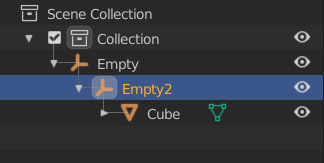
Add a "Parent to new empty" option to the Ctrl+P menu. This operator should optionally insert between an existing parent-child relation instead of replacing the parent. This operator can also be added to the outliner contextual menu
-
Allow for drag&drop insertion of parents in the outliner. Current shift+drag method replaces the parent completely and can not insert between parent and child
12 Comments
Along with that, I think empties could benefit from having a "No Shape" option in their "display as" property. to avoid clutter in the viewport Though objects don't inherit visibility from their parents in blender so creating an invisible empty would work as well but the first option sounds cleaner to me
* @muream * You can play with the (visual) size and shape of the empty in it's object properties, this allows you to make it really small, without affecting the actual scale transformation of it.
* @muream * You can just set it to not display in the viewport.
Hello! I have the distinction of being the one that started the Twitter rant. ;) Please see my following youTube video for how quick and easy it is to perform in Maya, then my ramblings as i attempt to recreate in Blender. youtu.be/SRFCQrhLQc8
Personally I dislike this Maya grouping standard. It is messy, cause people tend to transform the group and not the meshes inside the groups, without freezing those transforms on the meshes itself, which screws up a lot of things especially when rigging, or when a rig has to be changed later on. Also this can result in many ugly issues in game engines, which mostly can be noticed by Devs later on. It would be better to move away from the grouping workflow, as it is a Maya only thing. max users don't work that way either.
* @datadieb * This is not about rigging, Blender has a different rigging system than maya, this is just for grouping objects and moving them or going up and down the hierarchy...etc
Actually look at the list of Outliner Improvements for 2.81
" The outliner got many usability improvements.
"
Yes, afterall hooks already make something similar: creating new objects and estabilishing connections with the selection (in the form of a modifier thou)
This seems like the perfect thing to tackle with an addon. I've made a script like this before, but it was for bones in an armature.
Why not make Collections work also as empty group?, give them Transform Info and Parenting..etc and make them work like in maya ..etc Problem solved, this way you hit two birds with one stone, they can be used as groups and as layers, just tweak how they work a bit and make the difference between selecting the Collection itself and the whole Hierarchy.
* @PK_GO * except you can have the same object in multiple collections, so that would break the ability to use a collection as a "parent". Personally I find this functionality confusing
* @o.chabrand89 * do u mean when parenting/linking an object to another which is in a different collection? it doesn't make sense to have same object in multiple collections, i am not good with the new Collection system maybe the developers have a bigger purpose for this feature with overrides or something, but for us the end-users this should be simple and straight forward especially for grouping, if it can't be done with Collections then i guess Empties will work ,except you'll have bunch of them around and you have to manage them too., that could be messy.
that's why i would prefer Collections to work as empty groups so the Outliner stays relatively clean and easy to manage.