
image alpha
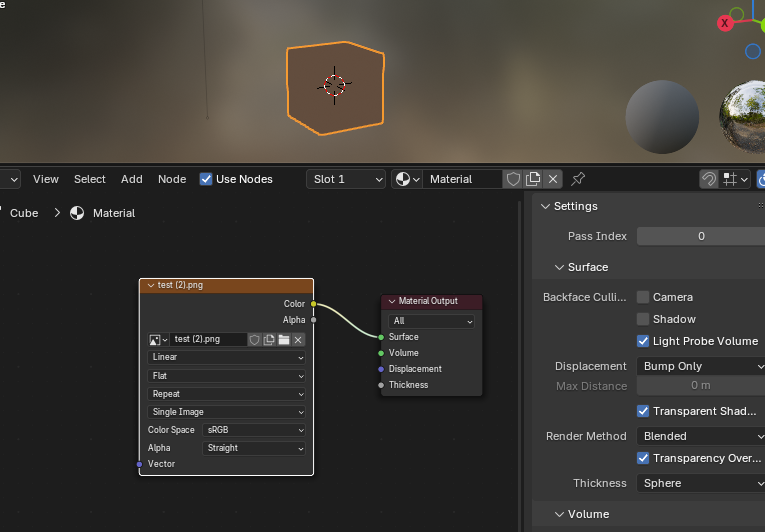
Ah, I don't know if it's because I don't know how to use it or something, but the opacity of the 4.3 Blender image doesn't work? I created an image with a transparency of 0.2 in Photoshop, and exported the image to a cube in Blender. However, the opacity of the cube is not displayed at all in Blender? And there is no coefficient to control the opacity of the image?The following is a simple image I made in Photoshop, and the other is a photo I imported into BL and assigned materials to it,It can be seen that the image in Photoshop is transparent, but the image in BL is completely opaque,Personally, I think we should add an option to control the alpha0-1 coefficient in the material and N panel

6 Comments
You plugged an image texture right into the material output. That equate to plugging it into an emission shader. Which has no alpha. Use a Shader that does have alpha instead.
This should be posted on blenderartists.org , not here on RCS.
ok
This sounds more like a bug report or question than a suggestion. It is already possible to use image alpha in blender.
Well, thank you
Why did you make that in Photoshop to bring in as a test when you can add a new image texture right there in the material and use the N Panel Node ab to see the properties of the image and change the Alpha value of the image there? Also, why are you hooking that directly to the output when for this purpose, you need to plug the Alpha value of the image into the Alpha of the shader node as in the Principled shader? Color to Color, Alpha to alpha input, boom you will see the shader perform as expected.
Thank you, I'm sorry, it's my problem. Actually, there was a slight color difference when I used clip studio to absorb the color into the blender. After connecting to the principle PSD, I felt that the color had changed a bit. So, I was wondering if some objects would have better color if they were not connected to BDSF,