
Switch tool temporarily
Sculptors and painters would enjoy this feature.
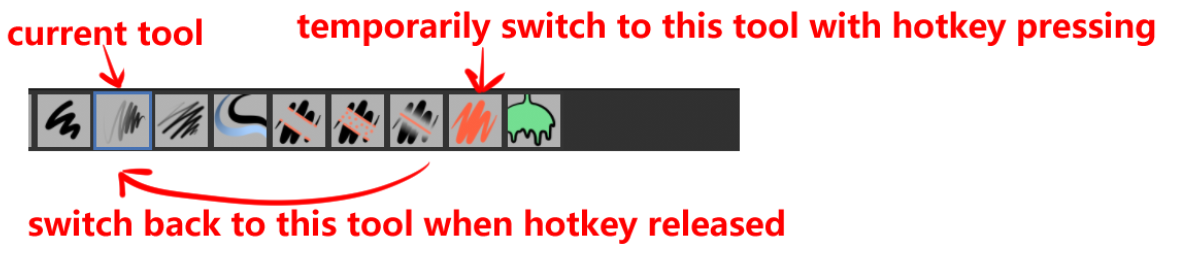
It works like this:
assign hotkey "A" to a tool "A-tool"
when artists using another tool(eg:"B-tool")
then press "A" and hold it ,tool will switch to tool "A-tool"
when release "A",the tool will switch back to "B-tool"
this feature is generaly in 2D paint applications and speed up artist's work.
4 Comments
This was called "supra/sticky keys" in Softimage XSI back in the days, which had this nice feature.
If you tap a key for a short (adjustable) timespan, like 0.2sec, you change the tool. If you hold it longer, you activate the other tool temporarily, and fall back to the first one after release.
It can be useful in many situations, not just sculpting or painting. Examples:
etc.
I agree to an extent but also , i don't see how this would work or how useful it would be in blender (the way it works in art programs like csp) . You can already hold ctrl to access the eraser when in draw mode. And the other transform tools are in different modes...
Well as of now there is a add on that gives you this functionality if you need it right now: blendermarket.com/products/grease-pencil-draw-transform/docs
I am a big fan of this, as I script a toggle to do this at times. This would be easier for me.
That's a nice suggestion, actually.