
Make toolbar and shortcut for the same tool act the same
I've noticed that there is inconsistency with the modeling tool you get from activating it from the UI toolbar than what you get by activating the very same tool with the shortcut.
This is poor design and leads to a lot of confusion, for both new users and seasoned alike. There's no rational reason they should act different.
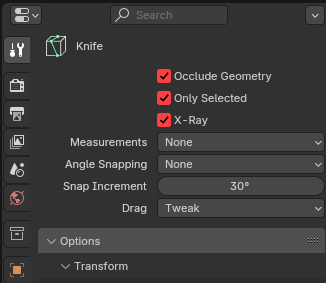
For instance, activate the knife tool from the toolbar. You have an option for it not to cut through non-selected elements (selected only). If you activate the very same tool with the shortcut (k), you get no such options and the knife tool with cut through anything that's in edit mode whether its selected or not.
I tried to find an explanation on why this behavior exists but only found a Google AI description which is as follows: 'In Blender, tools accessed from the toolbar and those accessed with shortcuts can behave differently because the toolbar tools (Active Tools) are designed to be more interactive and user-friendly with gizmos, while shortcuts directly execute the underlying operator with potentially different default settings or modal keymaps. '
I'm attaching a screenshot of the options you get when you activate the knife tool with the toolbar- you do not get these options with the shortcut.
In my opinion, Blender should strive to be consistent with tool behavior, no matter how the artist activates the tool.
1 Comment
Well, Active tools and Operators belong to a different concepts and assume different (NOUN/VERB) behavior, each of those concepts has their own benefits and limitations which assumes acting differently. So they could be designed only in parallel, but that was intentional choice. It could be polished a bit, but in general those concepts has different goals and therefore goes different ways.