
View All Edge Property Overlays Using Dashed Lines
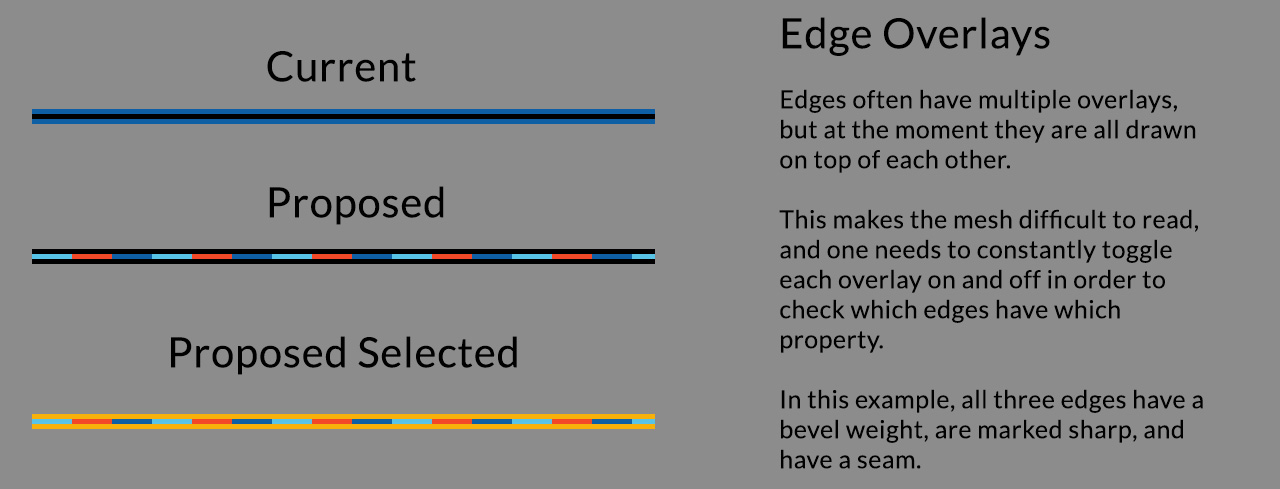
Currently, it's only possible to see one edge overlay (crease, bevel weight, custom sharp, and seam) at a time. This is means that we need to continually enable / disable these options while working in order to check what properties the edges have.
With this proposal, it would be possible to see all properties at once since they are represented by dashed lines instead.
8 Comments
We also have Creases that are colored purple. This colorful stripe may be hard to read I think. We need to see mockup on actual mesh.
@Bartosz Moniewski: Maybe something like this... ?
snag.gy/PDpank.jpg
Yes! Good point it will be a great solution for especially for hard surface modeling!
Great idea. I've always had an extremelly hard time working with hard edges and UV seams.
I agree 100%. This has always made working with meshes a little more difficult than it needed to be.
I'm trying to picture what a value of less than 1.0 would look like. I guess additive color on top of the black line would work pretty well.
@dpdpforlife: Good point! Or it could transition between a few degrees of HSL depending on the strength.
Ah! Interesting idea! You forgot to include freestyle.
I think it can be like this. When edge have marks it will look rippled and it is more noticable than just color. Do not forget we have 3 states of selection: none, selected, ative-selected. Long and short dashes can be visually separated too. May be just 2 lines together: one for multicolor dashes with spaces and another for selection?
{attachment 8213325jpg}