
Proposal for HOTKEY & MACRO MODE (+ Glimpse Device Manager)
Latest updates:
31. Juli: Proposal for macro mode was added (thumbnail).
Let's introduce a HOTKEY MODE and MACRO MODE which enables you to QUICKLY SET NEW SHORTCUTS or record MACROS by enabling the respective mode.
HOTKEY MODE
- Enable hotkey mode (UI Button)
- Selecting the tool or function of your choosing and pressing the key (or key combination) to assign it to.
- After a hotkey got mapped blender returns to it default mode.
MACRO MODE
- Enable macro mode and start recording (UI Button)
- Record all actions and settings you make as long the macro mode recording is enabled. Basically everything you would see in the Info panel should be written in order to something like a list for further execution.
- End macro mode by pressing the macro record button again (UI Button)
- Assign a button / key
Examples:
- Add your favorite modifiers like subdivision + set your preferred settings on it + add the displacement modifier + add a new texture + and then switch to a workspace with the texture editor.
- Add a new particle system + select a preset + set some additional options and maybe switch your viewport rendering to a less demanding option and toggle the overlays after that to your preferred option.
- In the sequencer: cut the clip at the cursor, remove the gap after and add a cross blend to it.
GOAL
With the new limited keymap a swifter approach was chosen to support individual workflows. A fast switching solution to set and unset hotkeys could introduce additional value to this new approach.
Set shortcuts based on your current need or the convenience to reach them on your input device. You could think about that as a approach borrowed from games where You finished your task, another assignment would feel better - change it real quick.
FUTURE (A glimpse of a device manager, maybe)
Imagine there would be a sort of a device manager (node editor) in blender that allows you to map input from various devices. Connect and use MIDI controllers, game controllers (gamepads) or even devices on the network that send commands to a network port which blender listens on.
Think about what a landscape of amazing open input devices that could open up.
Example:
Let’s say you got a Midi controller with four knobs that can be turned and pressed - like a button - and you want to use it to adjust numeric values by turning the knobs.
- Knob number one: +- 1
- Knob number two: +- 0.1
- Knob number three: +- 0.01
- Knob number four: +- 0.001
How you might setup something like that
- You select the device as node in the device manager (kind of node editor)
- Add and connect a listener node for each knob of the four knobs
- Add and connect a “selected increase / decrease” node with the function to increase the values of a selected field or slider when a knob is turned.
- Add the good old math node with a multiply setting to the knobs
Using it
Klick with your mouse in the value field you like to adjust or drag select multiple lines with settings. Turn the knobs and smile :)
What else could be done with that
- Set to fixed value 0 / 1 on button / pad press
- Map the default values to a button / pad
- Switch through presets with a knob twist
FINALLY
Would really like to hear your feedback on this. Maybe we can extract something nice out of this.
Some questions
- Is that something that could be done in pure python (the two modes)?
- What could be a solution for the key assignment part that omits the need to add a piece of code in every UI element just to enable it?
As for the device manager: This is mostly to give you a bit of a idea whats in my head. It would definatly need a detailed proposal on its own.
Thank you everyone, take care and have a great day \o/
5 Comments
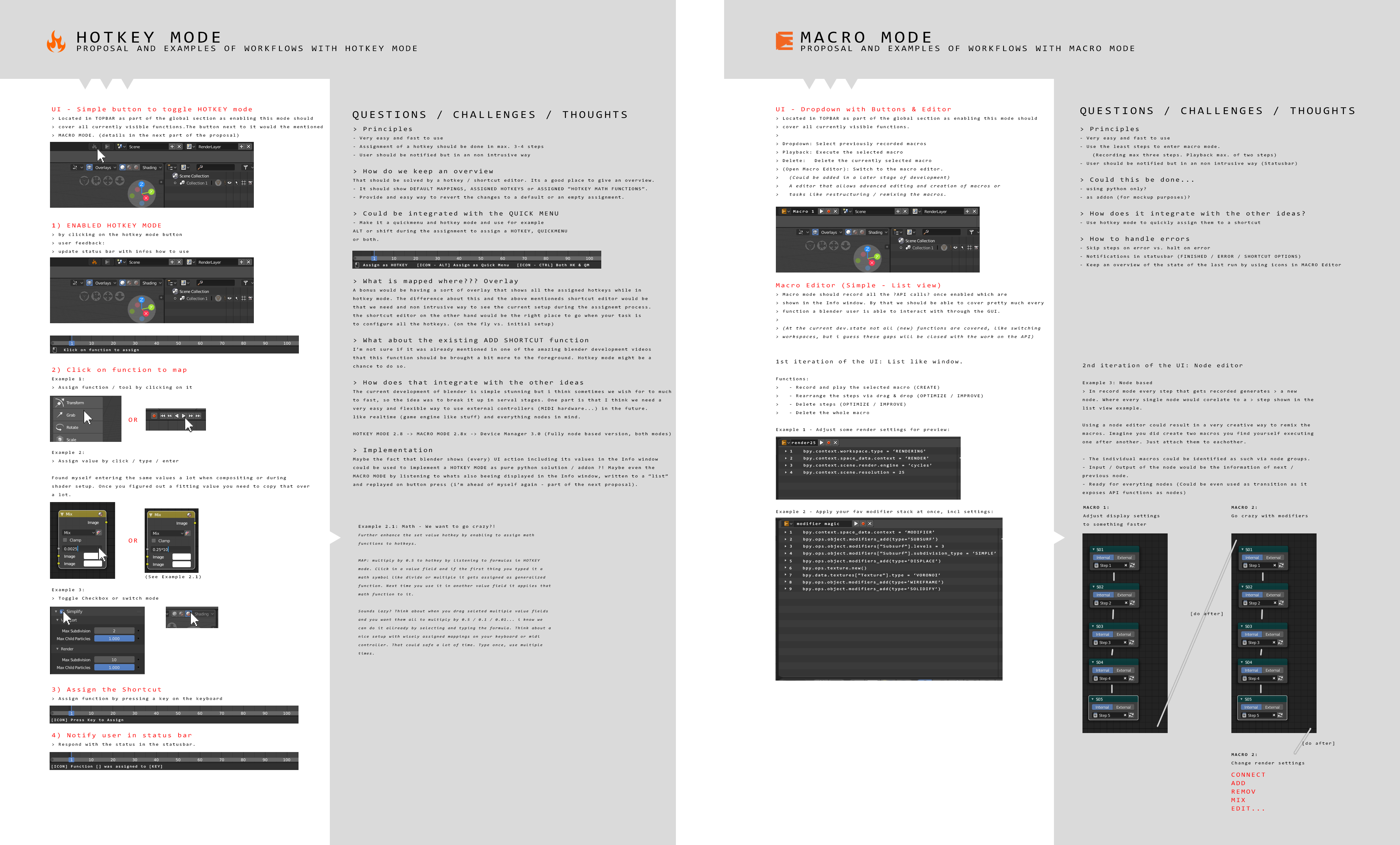
Just added first part of the proposal (HOTKEY MODE) as image. Hope that stears it a bit more in the right direction to generate something actionable or at least something to discuss :)
This proposal is in dire need of mock-ups and visual workflow examples.
@Jason van Gumster: Hi Jason, thank you a lot for the feedback. Thought that this might happen :) I will provide them and update the post step by step, starting with HOTKEY MODE. Have a good day mate :)
User: @xan2622 Hi. You might want to take a look at this Blender add-on:
github.com/Muthird/CommandRecorder2.8
youtube.com/channel/UC4PQV1bpboMQYIgJC5j_aSg
You can add it in your proposal
Kind Regards, Ros
Added proposal for macro mode. Looking forward to your feedback :) Take care everybody and have a nice day.