
Everything Search
proposal:
setting for turning all dropdowns into search
Elaborate:
On dropdown menu you can press a letter for quick selection:
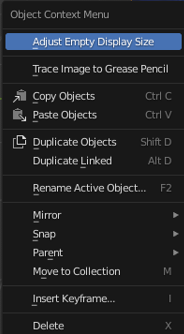 my proposal is to add a setting to replace that with a search like menu. Just like when you press F3.
why:
speed
clarity
keeping sanity
Profesional blender users may remember all those letters as well as the positions of the various items, but with blender changing so quickly its hard to keep up.
It is especially hard with the modifier menu, I have seen even some hard core users struggle trying to find the subdivision modifier there.
1 Comment
Modifier menu is a bit messy with all those icons. I am quite sure that most users just look for modifiers names. Would be nice if those icons could be removed (even optional in preferences), more transparent, or darker.
pasteall.org/pic/3c22c0d2c8cb44cfae4aa7b6a833ee6f
Search window in modifier menu is also not a bad idea. At least it does not harm to have it. To add search window to all menus, not so sure. F3 search is my way to go here all the time, except modifier menu where I prefer to click-select. I would find search window here quite useful.