
UV Unwrap along one axis
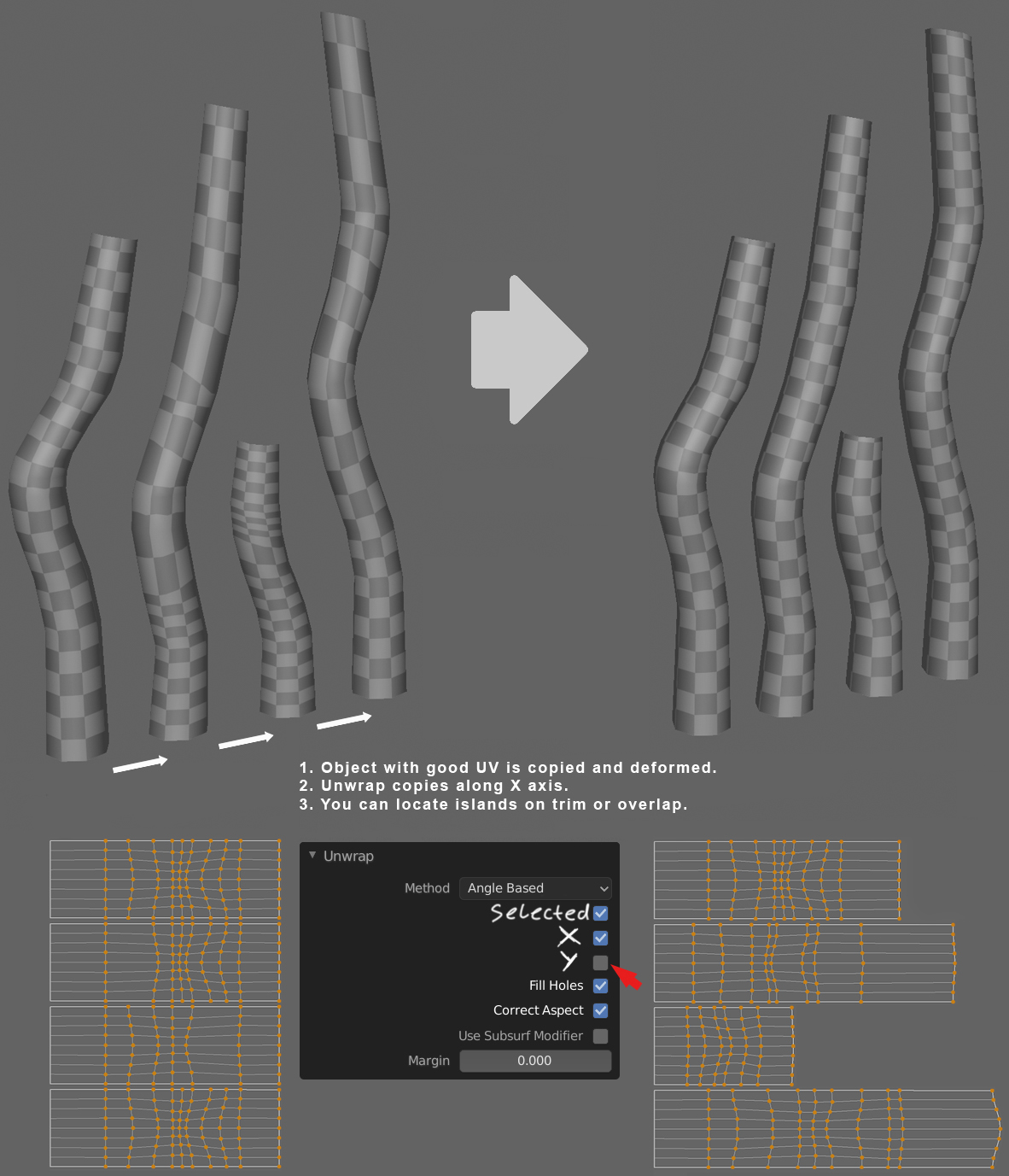
When you work with many decals mapped in a seamless trim on the texture atlas and copy them and change the length etc, it is difficult to correct UV of them, preserve uv will not help in many cases, so it would be nice to make it possible to unwrap the islands along only one axis.
8 Comments
And another default feature which other editors have for years. I dont understand how UV is still not in focus in 2020.
* @zelfit * In focus now developer.blender.org/project/board/115/ (need to register for view)
and I saw this function only in Maya from version 2018, not in other editors
* @Nikita Nikiforov * Yay. It fills my heart with joy. It is in roadmap now. I almost lost my hopes at this point
maya 2018 UV Toolkit has the core functions from Unfold3D aka Rizomlabs, that is why UV editor in Maya is really advanced now, true is that many functions from there would be beneficial in Blender. Quite few functions are now brought to blender via UV Toolkit gumroad.com/l/tslqD but UNFOLD ALONG U/V is not there yet
We reeeaaally need this..... Blender really needs to focus on UVs.
Well I guess it is found as follow active quads ... I guess ?
* @bassem.adel * No, it should work with triangles and ngons too. It seems I gave a too simple example in the picture :)
* @Nikita Nikiforov * yes I see , the example in picture shows a quad model