
Status line hints for CIRCLE SELECT need improvement
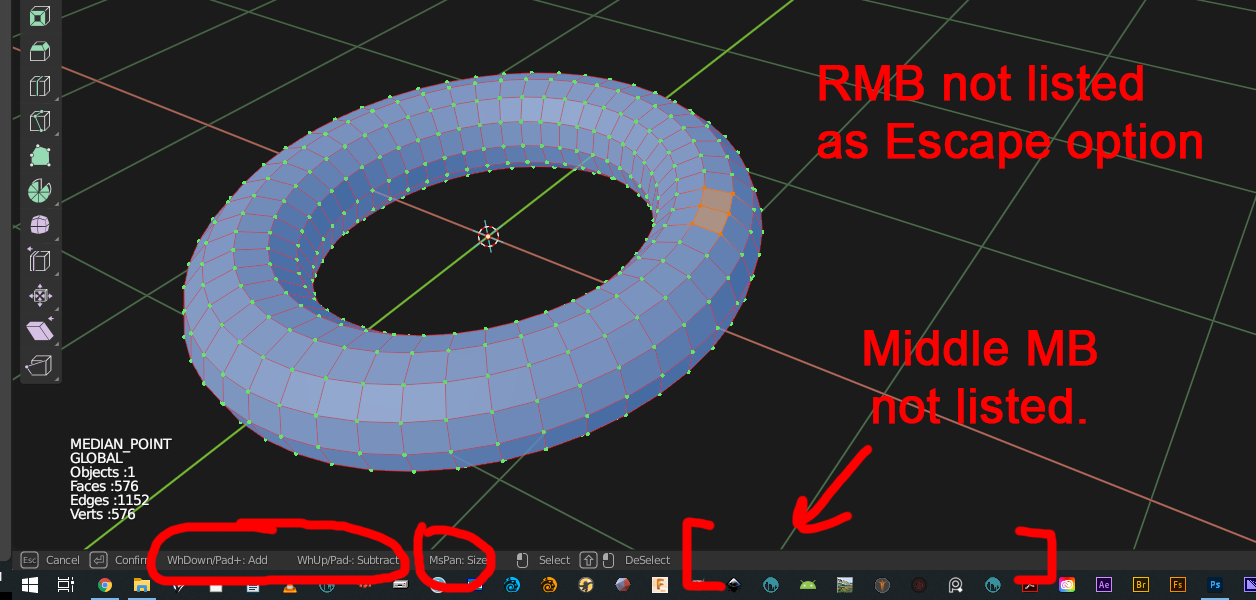
The status line hints for using CIRCLE SELECT is severley lacking as an assist for users:
"Subtract" and "Add" is a terrible way to say "Size Brush Smaller/Larger";
I don't even know what "MsPan" means;
RMB isn't listed as an Escape option;
and Middle MB (Deselect) isn't even listed.
3 Comments
I agree there are quite a few operations that could use the info bar a lot better.
I have never used this operation before but now that I try it; it is the only operation that I have come across that I cannot confirm with LMB.
Though, I am ok with this since LMB(Confirm) is shadowed by LMB(Select) and, in my opinion, it is more important to keep LMB(Select) consistent. And playing a little more; 'Esc', 'Enter', and 'RMB' all do the same thing.
They all accept changes when 'Esc' should really revert to before the operation was initiated. This is certainly a less than intuitive operation.
* @LilacDogoo * , I agree: not only is CIRCLE SELECT unintuitive, it locks out MANY of the functions of the UI, like VIEW PAN, ORBIT, and ZOOM. --I think this is a legacy of the ( always a bad idea ) Right Click Select mode of operation. I've used "circle" or "brush" selection on at least 2 other softwares that's LOTS easier to use.
There's also a weird thing that the old Blender hands (cultists for my money) talk about: "modal tools", that basically suck. Blender is already the most modal s/w I've ever seen, and within that all-encompassing modality there're tools that are even MORE modal, without AFAICS conveying any advantage: like in LW, the circle select can keep track of which vertex is chosen last.
Good think it's free.
I found that when we roll the mouse wheel while the LMB is pressed down, the diameter changes.
At this time, the mouse shows two different circles simultaneously: The new circle is in dotted line. The default circle is in solid line. This is totally unnecessary.
As soon as the LMB is released, the diameter reverts to the default value.
In the sculpting brushes, the diameter can be adjusted by pressing F and then dragging the mouse. Why not use the same method here too??
Even in the light of this decoded behavior, I cannot guess what "MsPan" means!