
Increase the width of dropdown menus
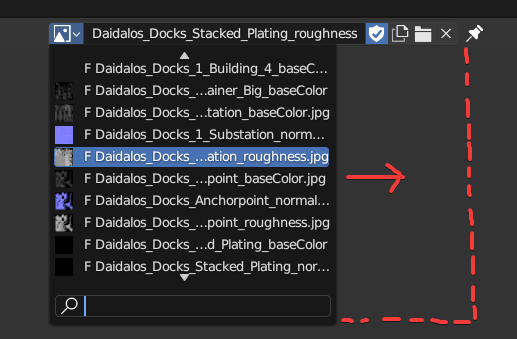
I've been working on projects, that have rather long texture files names. This leads to a lot of frustration, because Blender's dropdown menu in Image Editor/Image nodes/UV Editor/Material Selection isn't wide enough and cuts off names. See attached image.
Best solution is to dynamically increase the size from current size to the longest file name.
I did find a dev talk thread from a year ago about this and it did release as part of 3.6 LTS update, but it doesn't work in any of my cases. I tried all versions up to 4.2. Appreantly it only works with linked scenes? I need it to work with image files.
projects.blender.org/blender/blender/pulls/104603 projects.blender.org/blender/blender/commit/cfb112edcb6398d560a01dc2f1a3d9ca3a852974
7 Comments
projects.blender.org/blender/blender/pulls/127599
The linked change only makes the dialog wider if there is a linked scene, since that adds the blend file name to the right taking space from your name. You mention having "rather long texture files names" but how long are they? How much wider would the list have to be to contain the majority of them?
Roughly 40-50% wider, how I illustrated on the screenshot. My assest are meant for general public and I'm assuming people will be less experienced with 3D assets than I am. Combined with the expectation that they will be used together in one scene, I deemed it necessary to have easily identifiable and distinct names as possible. Hence the long names.
The longest name in my project is this : Daidalos_Docks_1_Container_Crane_1_baseColor
Alternatively, perhaps implementing a feature to grab a corner of the dropdown menu or the selected image box to widen it would work? That way it's up to the user how wide the menu is. Whatever works the best though.
50% wider seems reasonable. Will bring it up in our next meeting.
I poked the dev on the chat , we'll see what he says.
Thank you. Have they responded?