
Better autosave
Hi, I have a situation where autosave loses my work. For example, I open a scene from yesterday's work 2 hours and blender crush I open the blender again and go to take some water in the meantime blender overwrite my last autosave with the empty scene and I lose my work. There is no way to get it back with this situation. Will be great if Blender will be smart and know when is a new scene and not save it.
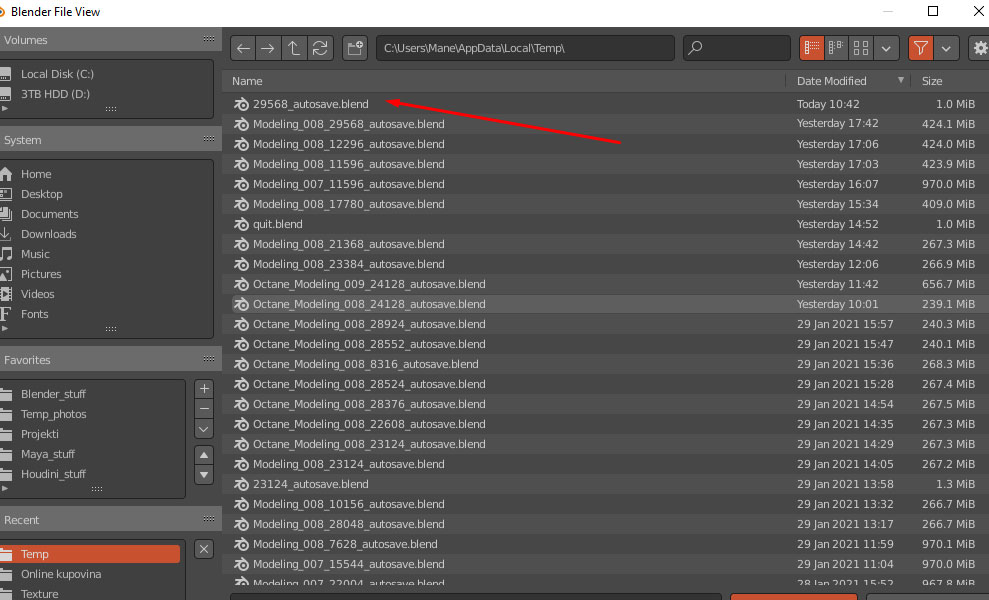
7 Comments
The autosave numbering system should be based on date/time, that would prevent something like this from happening.
* @Blender Defender * I personally hate date & time stamps in file names when it's only a way (and THE only one) to different them apart.
To me, it just piles up multiple information that just makes file names longer, reading times longer, and overall adds more clutter. So I prefer to have a good file name and a simple zero-padded number increment at the end.
* @-L0Lock- * I'm not a big fan of date & time stamps in file names myself, but when talking about auto-saves in a /tmp/ folder, date & time makes more sense than the system that we currently have. * @gulicmanojlo * also wrote:
Will be great if Blender will be smart and know when is a new scene and not save it.But computers aren't smart, they do what they're told. Not autosaving new scenes would mean, that the autosave system would only work for saved files. Date/Time would solve this problem in a very easy way:
Blender could keep autosaving new files without overwriting old autosave.
Greetings,
Blender Defender
My 2 cents are: autosave should save a different set of files for each blender file your working at, and every x time cyclic save over themselves.
For instance:
Start creating "Cube_1" project, after 5 minutes autosave will save "Cube_01_autosave_A" or something, then iterate every 5 minutes saving B, C... until the number defined by the user, in with case the next autosave would overwrite the initial one, keeping the same name.
Other projects, say, "cilinder_3" would have its own set of files.
That's sort of how it works in 3Ds max,..
I'm a little confused as to why people are relying on auto-save to save their work. The only time I ever found auto-save useful is in the event that Blender crashed. Is that not what it's really meant for? Personally I'd really rather not have Gigabytes upon Gigabytes of auto-saves of which are all the same files 10 minutes apart.
* @LilacDogoo * He said Blender Crashed, but I think, after at least one hour of work, you should definitely save your file.
* @LilacDogoo * Ideal autosave systems only keep one or two saves, because the main goal is only data recovery in case of crash, not archival for further editing a previous version or making-offs : that's the job of versioning or incremented saves.