
Add to collection option
collection in outliner is one of the best upgrades from 2.7 to 2.8
but at the moment workflow is still little bit strange ,
-
for example to add objects to multiple collection we need to press shift+ M which doesnt even show in which collection object is already in , so to check that we need to check outliner ,
-
now same thing with removing objects from outline ,we need to go into outliner and unlink from there ,
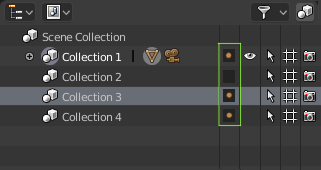
i think there should be something like this , so we can add and remove object in collection with ease
just click or shift click on small checkboxes besides collection to add objects

10 Comments
Could be better something that does not occupy so much space, for example an underline in the name of the collection
good idea, but please not with a point, just underline or lighten the collection name.
@dddjef: yes whatever solution .....either line or dots both are fine:)
@pratik solanki: You should maybe refine your proposal, some others people won't vote for something clutering he view, even it's usefull
@dddjef: I personally would prefer an icon feedback than a word underline.
How u imagine it have to look like & work when few objects selected. Even two. First assigned to 1, 2 collection second to 1, 3, 4 as u show. So ... what Blender should show you in such case, what should happened when you click on 3 collection?
@forestgumpovu4: if selected obj is in collection then it shows orange dot but to check which object are in which collection we need to expand collection hirachy and check .
do we have any solution for this in blender ? till now ? or even in other software ? if we have that kind of solutio. then it would be really helpful for everyone . please share your views. .
Woo! From twitter to here, good one. My vote right up! We need a way to tell which selection is in which collection, specially if in multiple.
@ondraise15:
same as earlier grey dot if that collection has objects in it and orange dot if collection has selected object..it does sound like oldschool layer widget in vertical layout .. but if thats usefull then its worth trying out
what say ?
@pratik solanki: Yes, the user feedback and ability to move to and from and add to layers needs a GUI, not exclusive hotkey use.