
Option to move modifier in stack to top/bottom & apply/delete all at once
With big meshes and lots of modifiers is maddening having to move modifiers one place at a time, so in case it is possible I would suggest something like this:Shift+LMB on "Move Up" or "Move Down" buttons move the modifier to Top or Bottom positions. And perhaps a RMB menu option should be included as well.It would be also nice to have an option to delete or apply all modifiers at once. I know it is possible to use ALT+C, but it's is not an intuitive option for most users.UI wise, given there is space on the modifier list button, it could be something like the attached image.
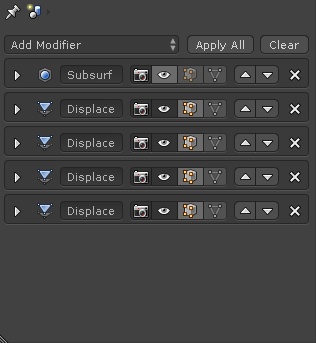
3 Comments
Yep. Alt+C operator is hard to discover by new users. +1 Moving modifiers on bottom or top is nice but best and mos intuitive solution would be support for drag & drop. Check this proposal: rightclickselect.com/p/ui/fbbbbc/drag-n-drop-modifier-stack
I agree. Drag and drop is probably the better way to handle this. That said, having quick hotkeys for "move to top/bottom" are a nice convenience option.
Yep, drag and drop was my first thought, but I also thought it would be more difficult to implement, perhaps I'm too comformist when it comes to proposals... :D But I'm happy to know about that proposal, and to know Julian has something in the oven!