
Append and Import should have "Use Existing Data" options
When importing and appending data, Blender always assumes the user wants to duplicate the imported data, instead of reusing existing data inside the target blend file, which is often wrong. Instead of assuming what user wants to do, Blender should give user a choice.
It takes just a few consecutive imports or appends to reach this kind of data state:
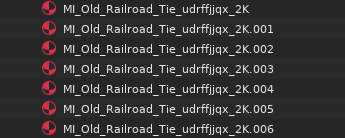 Which no one likes to see.
The solution is quite obvious:
Append file dialog as well as every single importer should have an additional rollout to specify what to do if datablocks of matching names are found in source and target file:
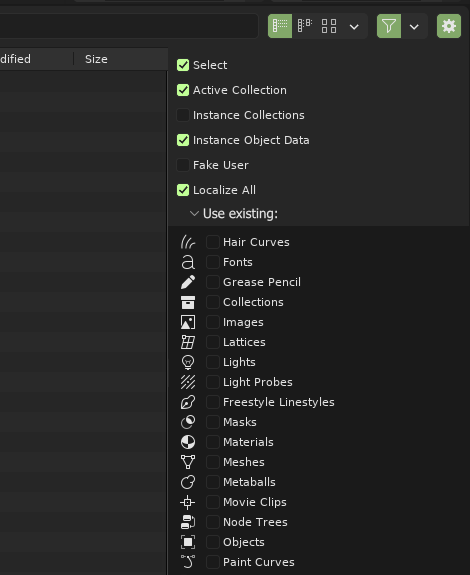
Defaulting to OFF state for all the checkboxes will result in the default behavior remaining unchanged, but if any of the checkboxes are checked, and a datablock of matching name is found in the target file, it will be used, instead of creating a number-padded duplicate.
So no more dozens of unintended duplicate textures and materials with number padded names.
1 Comment
My CAD-FBX import addon ( blendermarket.com/products/designer-tools-cad-fbx-importer ) has this function, but only for FBX so far. But this should really be a built in feature in blender!