
Render Baking inconsistencies-- is there a good reason?
After doing a lot of render baking lately, I've discovered some inconsistencies that I can't explain.
For example, starting with a blank texture with an Alpha channel . This is our target texture.
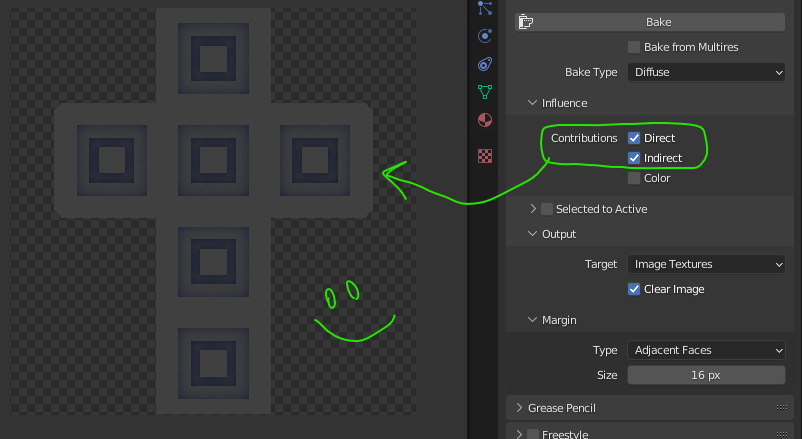
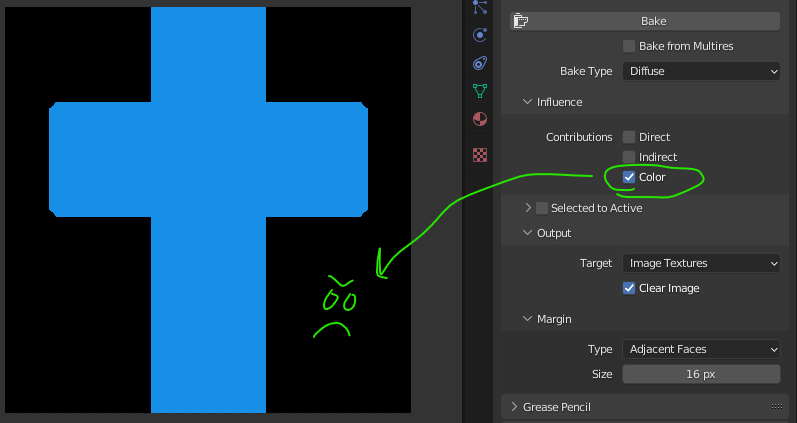
When baking the Diffuse , using the 'Direct' and 'Indirect' lighting contributions, the alpha channel remains intact (transparent background). However, checking 'Color' by itself causes the whole background to become opaque. Interestingly, checking all 3 (direct, indirect, color) keeps the alpha intact as well.
Some options, like baking Ambient Occlusion ALWAYS make the background opaque.
Why the discrepancy? I totally understand that alpha is not necessary for, say, an ambient occlusion texture. But sometimes I need the image to retain its transparent background (for image processing, etc.). Blender currently won't allow it.
So if I had a proposal, it would simply be to always keep the alpha channel intact (background transparent). If necessary, add a checkbox to the Bake dialog to toggle this behavior and don't make assumptions for each bake type.
0 Comments