
Blender 2.8 - 3d Cursor Concept
Here is the concept design for Blender's 3d Cursor.
The Idea:
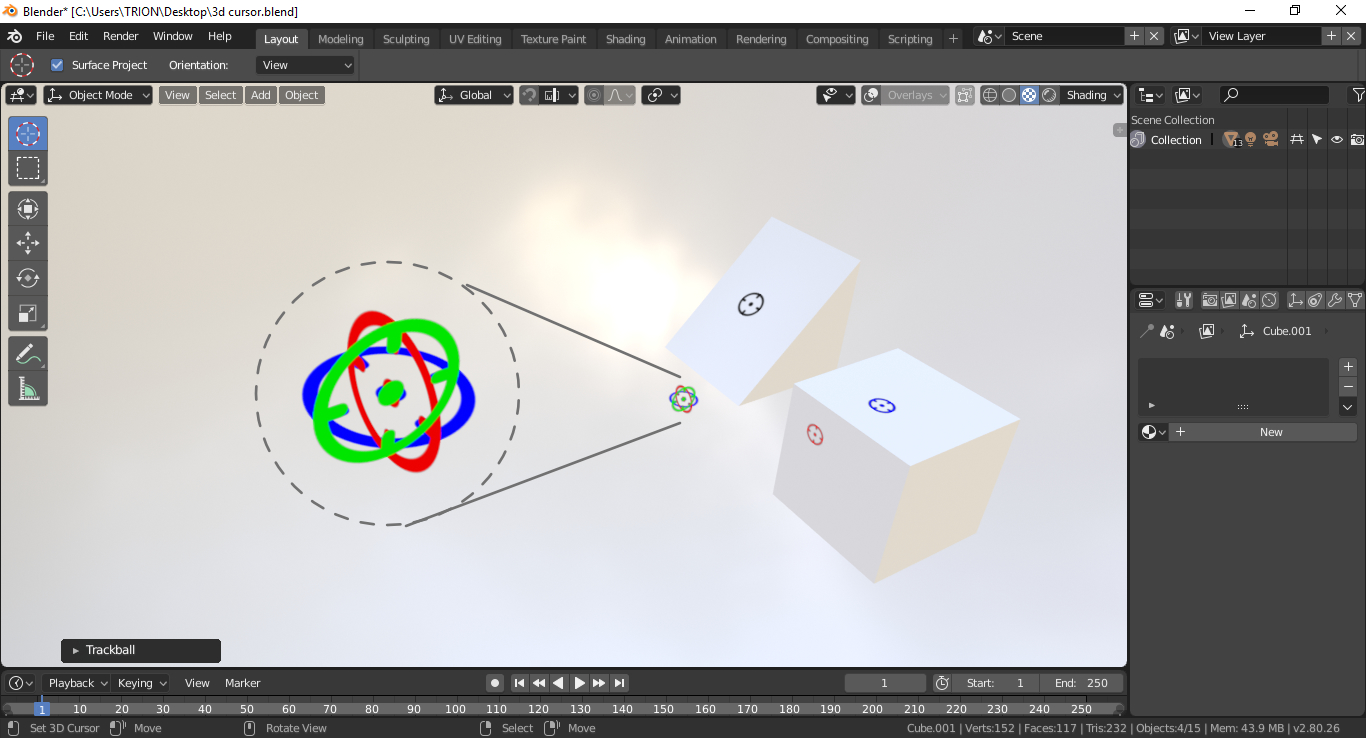
In Blender 2.8 we have a 3d cursor that works like other 3D objects. But if we represent that with three color variations it would be easy for the users to understand in which direction it is pointing.
https://drive.google.com/file/d/1s4lRrdVxSgvVPmKSlmuy0x5fkklbuE8C/preview
For example: If we place the cursor on the 3D workspace it has to show 3 directional circles with 3 different colors (right now it shows only black lines, red and white circle).
If we place the cursor on the mesh it has to show the directions like Red for X, Green for Y and Blue for Z with the direction and angle values on the top corner. The rest of the axis can be hidden while on a Face is selected. If we place the 3d cursor in another direction instead of X, Y, Z (like 135° angle) it has to change into black color.
Cursor position values: (Top corner or somewhere else for quick visiblity)
https://drive.google.com/file/d/1uv6k5q31a8blU4HF9pAKEmOCZbEEMeUT/preview
Cursor X,Y,Z rotation values:
https://drive.google.com/file/d/1SL0JhkBfxUYklcaA_4QSFnV6eqIWrzEB/preview
Cursor in Edit Mode with the Manipulator Widget: (I used spin tool)
https://drive.google.com/file/d/1gpmlxB8JGXOghxUkzRXTlJgUqumLy7O4/preview
That's All!
I have posted this in Blender DevTalk : devtalk.blender.org/t/blender-2-8-user-interface-design/505/740
You can share your thoughts here!
Thank You :)
5 Comments
with this is still impossible to understand where its pointing to, but an easy and great solution would be to just have a mode for the cursor where you can grab it as an object with the reguar axes.
@Luciano Muñoz: Thank you for the reply. That's a good Idea too. What I am trying to say is When we click on the face of the cube or any object. drive.google.com/file/d/1GFHe2bS95I_OTipo0KD3flsTsyRjYzPy/view we can't be sure that the cursor is on top of the cube or it's above the cube. And, Now we have a 3d cursor like a separate object. So I am proposing a cursor that changes the colors according to the axis. If the cursor is on top of the mesh surface, the color has to be blue. on the side it has to be Red or Green according to the axes.
@joerex123: I'll repeat what I said in the devtalk forum. I like this idea of having the cursor projected in 2d on the face you're snapping to. I don't think it's appearance should stray this far from Blender's iconic cursor. There are also benefits to having the 3rd axis projecting off the surface you are snapping to. For instance, if you need to rotate around that axis, it would be good to visualize it first.
@dpdpforlife: it's a cool idea but the question is this feasible? also the colors when put next to the transformation gizmos are too distracting..either the colors should only appear when they are on the surface or what like @Luciano Muñoz proposed or combine both. imgur.com/a/CZdKSAQ
@Luciano Muñoz: A while ago I proposed that the 3D cursor behaves just like any other object in the scene.