
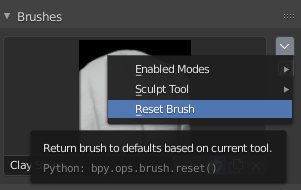
A Reset button to reset All Basic Brushes.
Wanted to introduce an idea. A reset button that resets all "Basic" brushes.
So what is a basic brush? It is a brush that is currently visible and usable in a factory reset file; Sculpt Draw, Fill, Clone, Draw Ink, and many more...
The reset button will leave alone all custom brushes that are not named the basic brushes. So your brush called "Claywet_noise_leveler" in the mask or weightpaint tool.. Will be untouched by the reset. So the reset doesn't delete any custom brushes.
Also if the named basic brush is not in the file, it will be then created.
It would be great if it resets all mode brushes at once. Less hassle for the user.. But may become a hassle to code. So if that cannot be done, maybe a reset button for each mode the user wants. By going to the mode and hitting the Basic Brush Reset button in the ui.
Placement:
If it can be coded to reset all brushes at once, then maybe place it in defaults. * File>Defaults>Reset Brushes *
If it can only be made for individual modes/object types. I recommend putting it somewhere in the viewport header. Just so it's not easily clicked on but easily found in a submenu.
How to Reset Currently:
So one way to reset brushes is to do a factory reset and save startup file.. Loosing all quick menu saves and custom shortcuts...
Or you can load a factory reset and save the file to wherever. Close blender and then open a general blender file. Rename all the basic brushes to random numbers and letters. Renaming brushes now helps so you don't have to rename the brushes that you are going to append soon. Make sure all of the basic brush's "fake user" is off. Now append the brushes from the factory reset file and save the start up file... And same steps goes for all the old files with old basic brushes.
There will be many more brush settings added in future builds; Sculpt, Vertexpaint, Imagepaint, etc. This reset button will not only help beginners but experienced users to reset brushes with ease. Especially when current brushes has been reworked from the ground up and changing in each .01 release.
This is only an idea. I am not a coder.
Thank you for reading this
4 Comments
I wrote a little addon to reset all sculpt-brushes.
blenderartists.org/t/reset-sculpt-brushes-addon/1214140
I would rather add this next to the Reset Brush menu item and call it Reset All Brushes.
* @billrey * It would be faster to get to.. But, it might end up being confusing for the user. Seeing two reset brush buttons beside each other, it might end up becoming a miss-click. Loosing connected textures in the other basic brushes. Then having to assign textures again to the affected basic brushes they were currently using.
This is so complicated wow Just tell me how to reset