
Groups & Collection Instances
A major pain point in Blender, is managing larger scenes that consist of many objects. Often times, this can be made easier by manipulating multiple objects as if they were one object. In many apps, this concept is called 'groups' - just like we already have for nodes (Node Groups) and NLA & Sequencer Strips (meta-strips).
In Blender, we already have a feature that essentially allows for this, called Collection Instances . They do make it possible to manipulate many objects as if they were one, but they are just impractical for these reasons:
- It is a pain to create an instance. You have to go to Add > Collection Instance and pick the correct one.
- It's quite impractical that it then leaves the original non-instanced Collection behind, so you have to manually manage both
- Editing Instances requires users to juggle between these two Collections - the original and the instance, which gets messy and confusing
- You cannot edit them in-place. You must edit them at the world origin
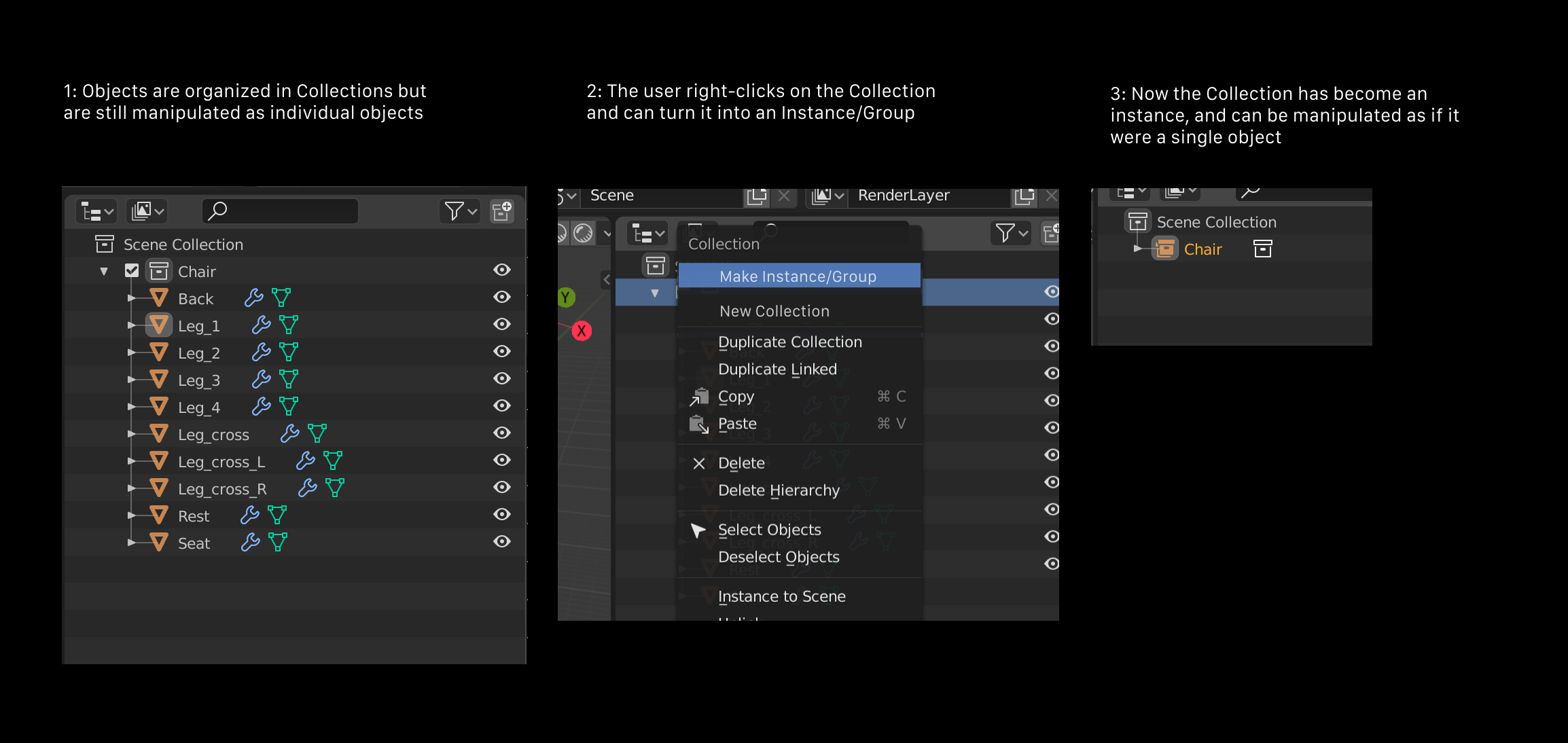
This proposal is to solve that, like so:
-
Users create a Collection like normal.
-
On any Collection, users can right-click and and pick Make Instance/Group. This turns the current Collection into an instance.
-
At any time, users can right-click on that instance and pick Edit Collection. This will allow users to edit the Collection in-place in the 3D View or Outliner.
Details:
- We should also make it possible to create and edit instances from the 3d view Object menu
- We should also include a quick way to make a new Collection Instance from the selection, in Object > Collections
- The default shortcut could be Tab, just like for meta-strips in the Sequencer or NLA, or Group Nodes in the Node Editor
22 Comments
For UI consistency, maybe this should be handled the same way as group nodes in the Compositor or meta strips in the Video Sequencer. Group nodes can be instanced like collections, but you can also punch into them and edit their innards. Likewise with Meta strips. Since they're all conceptually the same at a high level, the interaction models for each should probably be consistent.
* @Jason van Gumster * Yes, they should be. Tab for editing and Ctrl-G could create a new one, although Ctrl-G is already taken in the 3D View for creating new Collections. This could be re-jiggered to become more consistent, yes.
isn't grouping and instancing two different concepts, i would rather prefer to have something like in maya where you create a null object/node that only has basic information like transformation , this is very useful especially for rigging, i would rather wait unitl everything nodes is well defined and see how we can make this possible without overlapping two systems and with a nice hierarchy viewer that would be perfection :).
* @PK_GO * This is what an empty is.
* @Josephbburg * no it's not the same, what you call empty in blender is a locator object in maya which has shape node..etc while a null group is just a simple transform node, under the hood they are completely different.
* @PK_GO * No, they're the same under the hood. Blender doesn't work in the same way as Maya, but it uses Object ID datablock and Data ID datablock- an empty is an object ID with no Data ID attached. It's Blender's equivalent to a naked transform node. So a mesh is really just an empty with a mesh datablock attached. A light is an empty with a light datablock. It's different from, but analogous to Maya's transform and shape nodes, which are group nodes with various types of shape nodes attached.
Moreover, because an empty has no data associated (besides itself), you can't apply transformations as you can for a locator in Maya (or... freeze). If you want an empty to stay in place, you need to use a parent or a delta transform (which can be applied in the same menu as apply transformations).
The only difference I can think of between Blender's empty and Maya's transform node is that it has a display (which can be a plain axis, a circle, etc., or an instance of some real data). I'm curious what your perspective is, though. Are you a long time Maya user?
* @PK_GO * Well, it could be two different concepts, or it could not. Currently, a nice advantage of Collection Instances, is that they are real instances, meaning low memory usage.
Also, Collection Instances is something we already have. With some nicer ways to add and edit them, we arguable might not need to add an entirely new concept of 'groups' on Blender
* @Josephbburg * yeah, i am more familiar with maya than blender ... another difference, u can't change empty's pivot point while in maya u can it's used to drive the joints position/orientation for certain setups
* @billrey * well instancing means you'll still have a copy of the origin while manipulating it through the reference where the origin goes,and what restrictions this new instance/group have? this might introduce unwanted behaviours for example if you want to parent two different objects from two differnt collections, what will happen??also how will they work with everything nodes project when nodes are added for objects,bones..etc... i know we don't have much info about it yet but i am curious how all of this would work togather.
* @PK_GO * I'm not sure what you mean by 'origin,' so I'm assuming you mean ''original.' The way collection instancing works is: every object within the collection is duplicated, relative to the world origin. So it's good practice to place your collections at the center of your scene if you plan on instancing them. The instance is a single object, which is an empty. So parenting to the empty is like any other object parent.
I get the impression that you don't understand what collections are (there's nothing like them in any other software, as far as I'm aware). They don't have a place in the object's parenting hierarchy. An object is linked to collections, and can belong to as many as desired, or 0 (however, it will not be visible to the render unless it is linked to at least one scene collection ). Collections, in the same way, can belong to any number of other collections - these also need to be linked, in some way, to a scene collection to be visible. Their purpose is to organize the scene and outliner, rather than to serve a rigger (as groups do). They're like folders in a file browser, which contain 'shortcuts' (or aliases if you're a Mac user) to the objects within. You can make a 'shortcut' to Suzanne in as many folders as you want. The actual data is stored within the .blend file, and is visible in the Blender File section of the outliner.
To make a more practical example, say you have three candy machines in your scene. It contains gumballs, jaw-breakers, and jelly beans. Each candy is either red, green, or blue. Each machine has some of every color of each type of candy. With traditional layers, you have to decide which single layer each type of candy belongs to- do you organize by machine, by type, or by color? With collections, you can have all three, and you can even do something like this: Within each machine collection are blue, red, green and gumball, jaw-breaker, jelly bean collections. So, machine0 has machine0_blue, machine0_green, etc. within. You can also have a collection that is BlueCandy, that has machine0_blue, machine1_blue and machine2_blue in it. So Collections offer an extremely flexible way of organizing your scene.
So there's a blue jawbreaker in the first candy machine. It is linked to machine1_jawbreaker, which itself is linked to jawbreaker and machine1. It is also linked to machine1_blue which is linked to BlueCandy and machine1. I intentionally chose a complex and somewhat absurd example, but I hope it illustrates the point (I apologize if this is confusing, it's remarkably elegant in implementation). Collections are intended to give artists more control and more choice in their organization.
I appologize for being so longwinded! But it's a difficult concept that deserves a full explanation.
* @PK_GO * The answer to all that is simple: Collection Instances already exist. They already work - they are just impractical to set up and edit.
You don't necessarily need to worry about the original Collection here. You can already unlink a Collection, and the instance still keeps working. This proposal isn't to change the underlying data structures or concepts, which already work fine - it's about the workflow.
* @billrey * why can't collections act as grouping themselves? i never understood why this wasn't mentioned when collections desgin was first proposed, this is how other 3D app do it anyway, ur proposal still adds few steps it's like adding a mode to use and edit collections/groups, i would just vote for collections to be also doing grouping, u select the collection-> it selects all the objects inside it and if you delete it, it deletes them..etc very straight forward.
How would Blender handle collections linked from other .blend files?
Also, many of these types of suggestions aren't going to be doable until dynamic overrides are in place, I think they'll be in by 2.81 or 2.82--- then, it'll be a simple matter to add functionality to collection instances.
Your suggestion seems pretty doable right now, though. I think the 'make collection instance' should place an instance at the 3D cursor, rather than replace the collection in the scene.
* @Josephbburg * You can already link in Collections from other blend files. That has no bearing on this I don't think
* @billrey * It does. You're suggesting an ability to edit collections-- "At any time, users can right-click on that instance and pick Edit Collection. This will allow users to edit the Collection in-place in the 3D View or Outliner."- what if they are in another file? I imagine this will need dynamic overrides to function. You can't edit linked data at the moment.
* @Josephbburg * Just like today, that just wouldn't work. You cannot edit linked collections.
All the questions about what Collections are, and what Collection Instances are, are not really relevant. These concepts already exist, and this proposal is not to change that - only to make the workflow easier.
It's likely going to be an unpopular opinion, but I agree 100%. I don't understand why it takes 5-8 clicks to do something that is so simple in other programs. Right now you have to create a collection, drag the stuff you want in it over there, at this point most people are probably going to want to go to each object individually and remove the OTHER collection from the collections list, which can be extremely time consuming since there's no multiple-edit in Blender. Oh, and if you want your "Group" to have a transform like in other programs, you need to make an empty, put it in your new collection, and then parent all of the objects in that collection to the empty. WHEW. what a great experience! In maya, I press ctrl+G. in modo, I press ctrl+G. In max, I have no idea but I expect it's equally easy.
And yes, before anybody says it- this could be automated with python quite easily, and I have done that- but new users coming from another major software will be experiencing the thing I just described above.
* @testure *
This is incorrect. Blender has had the ability to edit the properties of multiple objects at the same time since the 2.7x series. And 2.80 allows for multiple objects in Edit mode.
* @Jason van Gumster * Somebody should tell blender that, because it disagrees: vimeo.com/337893415
In the video: multi-edit of location not working. multi-drag into a collection not working. multi-edit of collections (the example I gave in my post that you disagreed with) not working. do you know something I don't? because I would love to make this work, I waste too much time each day working around the lack of multi-edit in Blender so if I'm just an idiot I would gladly eat some crow to make this happen.
* @testure * Did you try holding the alt key?
* @Josephbburg * Just tried it- and it does work for setting the location, but not for removing multiple objects from a collection. So, while I did learn something new today- my original point remains :) Thanks for the new info, never in a million years would I have thought to try pressing Alt first.. such a bizarre non-discoverable way to handle that, this will save me a lot of time in the future for sure.
As a side note to anyone else reading this and learning something new- you have to press alt as you click into the field, not when you press enter to commit the new change (which took me a few tries to get the hang of).
* @testure * Yeah, I didn't know for the longest time. You can remove multiple objects from a collection by selecting them in the outliner, then right clicking and choosing 'unlink.' I'd like to see a way of doing it with the view-layer's selection, too. And of course, it could be good for consistency to add alt-click to the object's properties menu, perhaps you should make a proposal?
Also, you can use shift-M in the viewport or outliner to move collections, as well as clicking and dragging multiple objects in the collection.
The problem with multi-editing, as it is done in some other software, is that sometimes the user does not want the action to apply to all objects, and often the action is context sensitive, anyway (like applying a modifier-- if I apply the first modifier in the stack, let's say a SubSurf modifier, should the other object have the first modifier or the first subsurf modifier applied? Or should it do nothing if the modifier stacks are different?). It's good to have a toggle, like the alt modifier. I agree that it needs to handle more types of multi-edits, but there are a lot of edge-cases to consider.
I tend to use Python to do multi-object edits, since it's faster to do many precise edits. I can even define my own rules for which action to take in which context. I can save my script and run it whenever I need to. Or I can save a template and make minor edits, depending on which property I want to edit. This is especially useful while rigging, because I might be editing bones with very different constraint stacks. If you're interested, I'll link you an article I wrote about this.