
VSE as a Render Queue
This feature has been proposed before , but it's worth revisiting in more detail, especially with Eevee entering the scene.
Problem
Blender does not currently have a solution for managing shots in an animation or a way to selectively render them conveniently. There are ways to batch render multiple shots into a single file, but the editing process is far from elegant.
The rendering process is "all or nothing", meaning that in order to render individual shots, you'll usually find yourself frequently adjusting the start/end time of an animation and manually starting each render, just to avoid wasting the time of rendering the parts you haven't changed. In order to work on the final cut of your project, you'll have to hunt down all your rendered output files and load them into the VSE or some other video editing software. This constant jumping back and forth is a serious bottleneck in the workflow.
There are currently three options for batch rendering multiple shots in Blender:
Camera Markers
 Pros:
Pros:
- Results in a single contiguous output
- Visual editing and live preview of result
- Quick and easy
Cons:
- Can only be used within a single scene
- No way to create transitions -- cuts only
- Rendering individual shots is not elegant
- Cannot cut between scenes
- If multiple scenes or transitions are desired, clips must be stitched together afterwards in a video editor or with command line tools
- Cumbersome to adjust timing and duration of shots
VSE Scene Strips
 Pros:
Pros:
- Results in a single contiguous output
- Visual editing and live preview of result
- Selecting active cameras is a one-click process
- Transitions and timing adjustments are simple to do in a nonlinear video editor
- Multiple shots may overlap during a transition
- Editing transcends scenes; clips may be sourced from multiple scenes, allowing cuts between different scenes
- No need to wait until after the render to build the final cut; the VSE serves this purpose natively
Cons:
- Rendering individual shots is not elegant
Running Blender from the Command Line
Pros:
- Slightly faster render times
- Reduced memory footprint
- Any scene can be selected
- Batch processing -- multiple commands can be run automatically in succession, and the user may include additional calls to other command line tools such as ffmpeg
Cons:
- Not user friendly; no GUI
- No visual feedback
- Writing commands is not an elegant process; user must open the project in Blender, find various frame numbers, then enter them into the command manually
- Shots are rendered to separate files; this is better than camera markers, but not as good as the VSE, since they must be stitched together afterwards in a video editor or with command line tools
- Selecting active cameras is a comparatively complex task
- User typically has to close the Blender environment during the render to avoid loading the project into memory twice
As it stands, it seems to me that the most productive and feature-rich option for making a cut is the VSE's scene strips, but it's still lacking to some extent, and a few changes could be made to massively improve the usefulness of the VSE in Blender.
Proposal
I propose that we finish what's been started. All the puzzle pieces are there; they just need to be assembled:
- Scenes
- VSE
- Scene strips w/ camera override
- Proxies
- Live preview of scene strips in VSE
Scenes are nothing more than a fancy organization feature at this point. You could use separate .blend files, but it's more convenient to have them all in one project. You can also use a scene as a background for another.
The VSE gets the job done as a free video editor, but there are much more practical and feature-complete options out there, and Blender isn't usually the go-to choice for video projects.
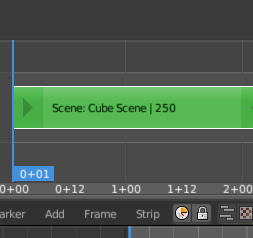
Scene strips were added to the VSE a while back, and they allow the user to insert their 3D animation directly into the VSE timeline instead of having to render them out first. The downside is that the Rendered mode is basically useless for Cycles previewing because the program hangs until all the samples have been processed. Often, simply selecting Rendered mode with Cycles GPU rendering enabled can crash GPU drivers. Clearly we'll have to settle for something of a lower caliber, such as Textured or Solid mode. As a result, the VSE viewport cannot show an accurate representation of the final product in any practical way. However, with Eevee on its way, I'm holding out hope that this will change.
Alone, most of these features don't go beyond "kind of useful in certain cases", but a few simple changes to the interface could tie them together and turn them into an essential new part of the Blender workflow.

My proposal is to make use of the VSE's scene strips to give Blender a simple yet effective render batching system.
Each scene strip can be in one of the three following states:
- Live
- Rendered
- Outdated
Live scene strips have not yet been rendered. The preview in the viewport behaves exactly how scene strips do currently -- a low-quality real-time preview of the scene.
Rendered scene strips have been rendered to a file. When the playhead passes over a rendered scene strip, the viewport displays the rendered video clip instead of generating it in real time.
Outdated scene strips are just like rendered ones, but Blender is telling you that you've modified the settings, the active camera, or the contents of that scene since the last render was completed. In this case, the rendered frames do not accurately reflect the current state of the shot, and it needs to be re-rendered.
With this simple scheme, the user will be able to preview and edit the final cut of their project in an intuitive and WYSIWYG way at any point in the design process, completely sidestepping the issue of manually rendering small fragments of an animation and piecing them back together later.
Two important buttons control the entire process:
Render All Clips
This button, located beside the two existing render buttons at the bottom of the VSE, would allow the user to execute a batch render of all clips that are either live or outdated . When the process is complete, all scene clips have been promoted to rendered status. Clips that are already rendered aren't even processed; they're automatically skipped because they're already up to date.
Render
This button, located in the right toolbar, allows the user to tell Blender to render a specific scene strip instead of updating them all at once.
When a scene strip render is executed, the file(s) is/are stored in the currently selected output directory, just like any render. The only difference is that the scene name and a unique number (.001, .002, etc.) are appended to the filename, so as to give each file a unique name and associate them with their corresponding scene strip in the VSE.
If the scene strip is deleted from the timeline, the associate rendered files are NOT deleted. Renders are precious. It's better to keep them around in case it was a mistake.
Blender is a very complete piece of software and virtually every step of the creative process from start to finish is addressed. However, it's clear that when it comes to the process of putting everything together into a completed animation, the tools Blender provides are incomplete. The existing tools need a just small push in the right direction to become much more useful. I believe simple changes I've described could pave the way for a brand new workflow that supports the creative process instead of obstructing it.
3 Comments
If you want to test your suggested workflows, you can find several vse batch export add-ons here - and also an add-on to convert "bind-to-camera-markers converted to vse scene strips": docs.google.com/document/d/1K7MM-JpcrRIclhXKHOpBHCpBVLq0KZ0W5BocKaEUu6o/edit
A big problem with this proposal is that it assumes that renders are done to single video files. This isn't how it's done and is not a recommended way to work at all. This also means there should probably be a 'partially rendered' state... the problem, though, is tracking. Without parsing all of the rendered frames (which can be slow on large scenes), it would be very easy for Blender to lose track of what's rendered and what isn't.
Also, naming outputs should remain with the scene (whether in the .blend file or linked from another one). It would be nice to be able to easily modify those paths without jumping to those scenes, though.
@Jason van Gumster: Regarding the "partially rendered" issue, the way I see it, a strip that is missing frames is not rendered. The system would simply check for the existence of every frame on the drive, and if any are missing, the strip is considered "not rendered".
This also gives me the idea of automatically incrementing a "revision" number for each strip when changes are made. This revision number could be appended to the file names so it would be able to identify outdated frames on the disk. With this information, it could skip over frames that are already rendered and in sync with the current revision. This would be useful for finishing a render that crashed or was aborted, as well as automatically cleaning up old frames cluttering the disk.
In any case, I'd say there are a lot of reasons why keeping track of modification state for each individual frame is a disaster waiting to happen. Just monitoring rendered state should be sufficient, which can be queried by simply checking if the file exists. If modifications are made to the scene, then the entire strip(s) should be considered invalidated.
"Also, naming outputs should remain with the scene (whether in the .blend file or linked from another one). It would be nice to be able to easily modify those paths without jumping to those scenes, though."
Indeed, I forgot to consider that output paths are associated with scenes. It does make more sense to leave that as it is. As you said, it would be nice if the output path were accessible directly from the scene strip in the VSE. Another solution might be to have a global output path for the whole project, then provide a checkbox in the output panel for scenes that allows the user to override the global path if they want.