
Assigning multiple matcaps to an object in solid mode
Hello guys I would like to request a feature where you can assign multiple matcaps to an object similar to the way a user assigns multiple materials on a single or multiple objects.
Ex: wheels == metallic + rubber matcap
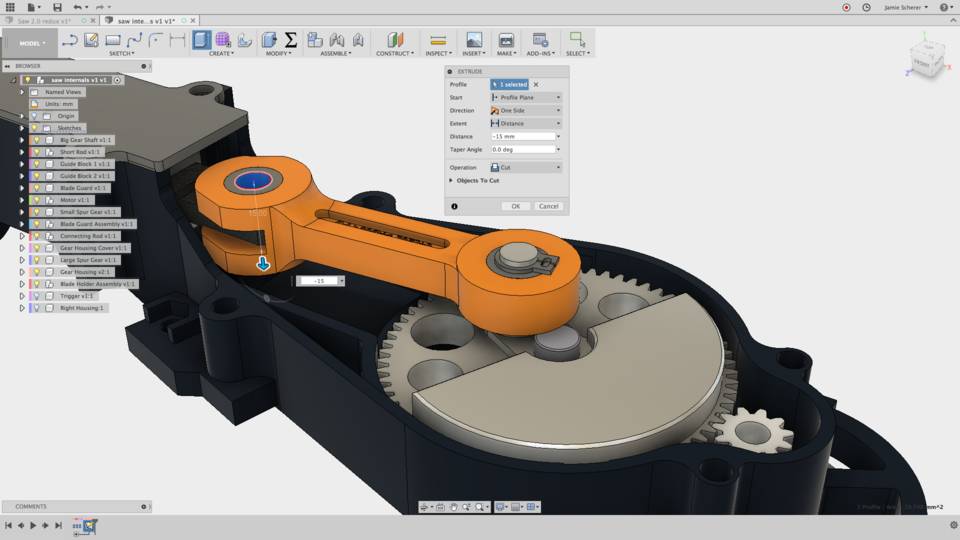
The sample image is from fusion360. It would be nice to have those similar looks in some ways be added to blender.
This would be a good way of visualizing your model without using the render mode or the lookdev which I believe works nearly similar to render view. I don't know if this would be faster than lookdev but it is nice to have this option.
Thanks.
12 Comments
it is easy to do with nodes. Here my matcap-tester. {attachment 6560221jpg}
* @ Vyacheslav * Thanks man. I guess this is what Mr. Gumster was referring to. I guess I wouldn't need to request this anymore. Very helpful.
I am already aware of the emission shader technique but the vector transform is new to me.
* @johnpdelacruz26 * You can make it emissive only for camera, and monocolor diffuse-glossy for scene. Also easy to separate with light-pass node IsCameraRay. But usually, if you use matcaps, you use lightless scene.
Cycles and it`s node system is awesome for different cheating.
* @ Vyacheslav * Yah. I have discovered that also using camera ray to create a shadeless render. This is very helpful when you want to have a faster render.
you should go to my chanel 5 days ago lol youtube.com/watch
I wouldn't mind being able to quickly pick multiple matcaps in solid view mode. It'd be more beginner-friendly than setting up nodes and having to use a materials or rendered view. Also, other people might appreciate a super fast way to prototype a scene without having to set up multiple nodes and lights. Also, adding custom matcaps into solid mode would be cool, too!
From what I know I think the matcaps doesn't need lights and maybe that would help you to visulaize your model without the use of render mode and also lights or hdr's.
What I am not sure is if what I have just said would actually be right.
* @johnpdelacruz26 * Matcaps don't need lights... But the kind of mixing you're talking about can already be done in the Shader Editor. And if you set up the matcaps correctly, you can see them in Render view or LookDev without any lights (or the performance drop that I think you believe you're seeing.
* @Jason van Gumster * Do you mean this would be possible in solid mode and not only in lookdev or render view? What I am trying to say is in solid view which I forgot to specify.
* @johnpdelacruz26 * I'm saying that I'm sure it's possible, but at some point the amount of work you're putting into mixing for Solid view amount to the same amount of work you'd put into actual materials in LookDev or Render view.
The question is, I suppose, why do you feel you're required to work in Solid view? Is it performance? Technically Solid view is also using Eevee to render, so you should be able to get the same performance in LookDev as you get in Solid view.
* @Jason van Gumster * I wanted to achieve the effects similar to the matcap. I didn't knew about using the vector transform to emulate it but Vyacheslav shared some techniques and I think this is already good for what I was trying to find.
How would this differ from just using a material (textured with a matcap) and working in LookDev (or Render view, if you're using Eeve)?