
Camera Movements Controls
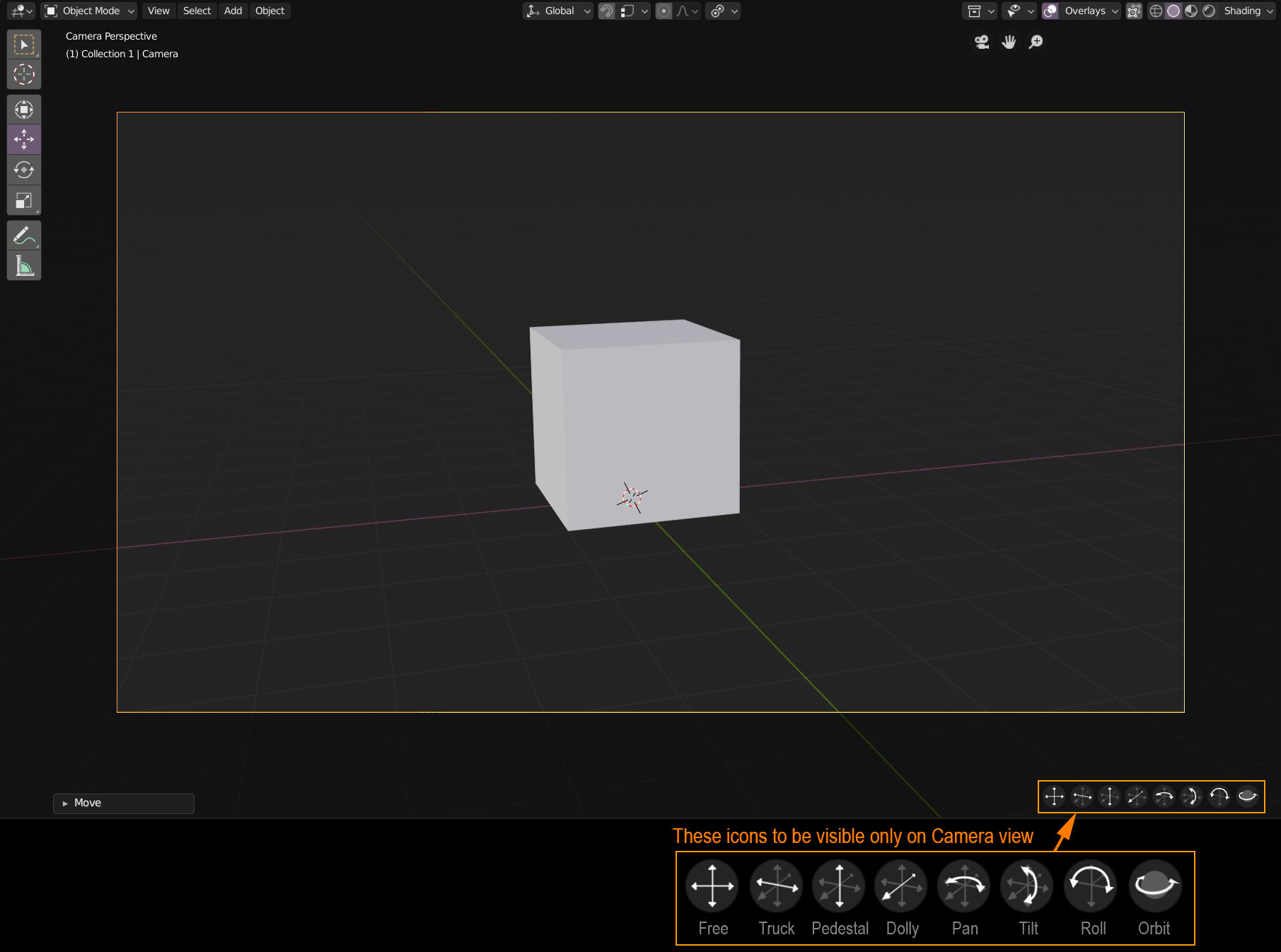
When we are in Camera view, we could have better controls to adjust the framed view with more precision.
Here are the movements I wish the camera could have:
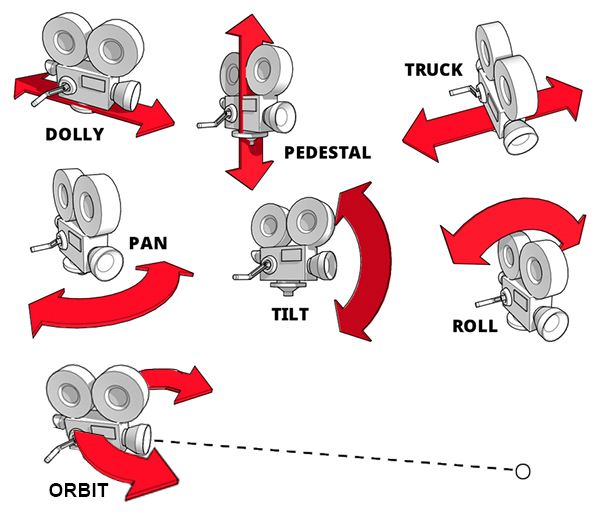
- Free: A mix of "Truck" and "Pedestal" movements. To be the default (that's what we already have).
- Truck: moves only from left to right on camera's axis.
- Pedestal: moves only up and down on camera's axis.
- Dolly: moves only back and forth on camera's axis.
- Pan: camera stays still, moves from left to right.
- Tilt: camera stays still, moves from up and down.
- Roll: camera stays still, moves from left to right.
- Orbit: If a camera has a target, the camera rotates around the target which stays in place (see this thread:
Link ).
There would be 2 methods to use these controls:
Method 1: Select the control with a single click. Tweak anywhere on the screen to perform the movement.
Method 2: Tweak/drag directly on the icon (similar to the icons on the upper right corner)
10 Comments
Truck: G + XX + move mouse; Pedestal: G + YY + move mouse; Dolly: G + ZZ + move mouse; Pan: R + ZZ + move mouse; Tilt: R + XX + move mouse; Roll: R + YY + move mouse; For orbit you can parent the camera to the orbit object and then rotate the latter or Lock Camera to View, select an arbitrary object to orbit around and middlemouse-rotate the view (provided you have enabled 'Rotate Around Selection' under User Preferences > Interface)
@Lsscpp: Never thought about using the transforms this way for the camera. It does the job. But I think the approach of my proposal still stands because it's more visual and more intuitive. Just like we can pan with shift + MMB, but we still have the icon with a hand in the upper right corner of the screen.
For orbit though, I don't like the extra steps of putting constraints in order to perform such simple actions, hence my other proposal of a camera with a target.
@Lsscpp: So as it is already possible to do those movements with shortcuts and mouse, it should be possible to have such a set of visual camera controls.
For beginners, it would also be a much more intuitive way of moving the camera.
I think Blender also needs a mode to simply navigate the scene in camera view the normal viewport way. It still feels weird to me that camera mode is a fixed view or a lot of indiviual keypresses. Why no just have a checkbox in the camera setting for "lock view". If it's turned off the camera moves together with the view if it's active.
This is a wonderful idea. The 'walk navigation' is also quite useful in camera mode and could use an icon button too.
This seems like an idea that's ripe for a camera rig add-on.
Just select the camera in camera view and move it in all these ways with keyboard shortcuts....
It is a really interesting idea. But what if the camera has already a focus empty or object ?
@pcservice.dordogne: I assume that focus is a Track To constraint. If that's the case, the movements still performs as expected, except the camera is always looking at the focus object. So it's like a normal movement but with a constraint.
@Ryxx: Yes, I mean Track to constraint.
As the existing gizmo disappears when in camera view, it could be replaced by your mockup. Or placed just outside of the border of the camera view rectangle.
The orbit should be enabled only if there is a Track to constraint, because a central point is needed. As you have shown on your picture.