
ASSET BROWSER - "TEXT" LIST WITHOUT THUMBNAILS
It's great that the browser has previews of various sizes, but would also be great if it could just display as a normal text listing, and showing the FULL name of the asset.
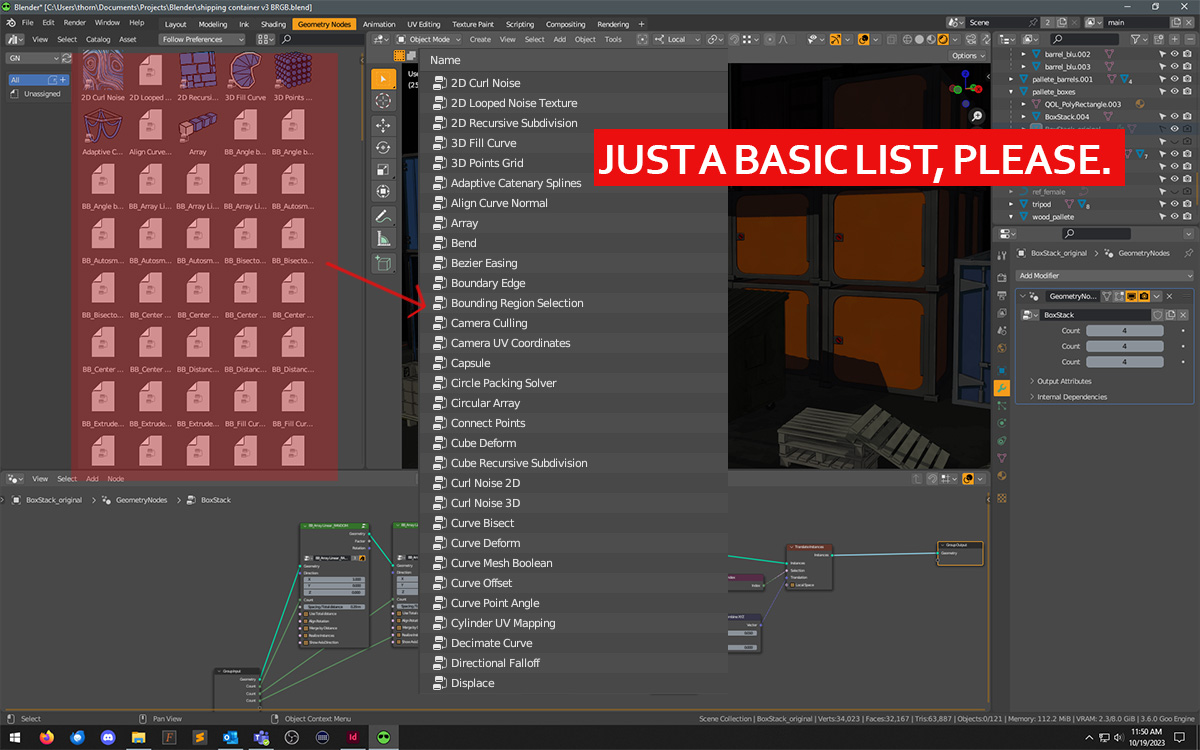
It's great that the browser has previews of various sizes, but would also be great if it could just display as a normal text listing, and showing the FULL name of the asset.
5 Comments
This is already (unofficially) possible, because the Asset Browser is basically a File Browser under the hood.
Turn it on with the shortcut for the "View" pie menu, usually triggered with
~.I said it is unofficial because it wasn't worked on, it's just a happy accident. For it to be officially supported it needs the
Date ModifiedandSizecolumns to actually show something, and perhaps introduce columns for tags or other attributes that haven't been designed yet. Maybe you could adjust this (or make a new) proposal to think which columns should be available, if any?Author, License and Source columns for sure. Source doesn't have to be entire path, just name of the Blend file its saved in.
But for it to be properly usable I think its also important that size of the items can be modified, they're too small currently hardly readable for me. And cherry on the top would be if thumbnails can also be displayed next to next
Thanks for the tip, that does work.
I legit thought it was a thing already and went to take a screenshot, and then realized it's not. 🥹
Also, it would be nice to have a detailed view showing modified/created dates, author, path, .... Pretty much all "general" metadata any file can need + what the asset browser let us define manually:
This should be applied, too, to the catalogs shelves (the brushes shelves in the 3D Editor's paint and sculpt modes, the FX one in the Compositor, etc.). Those share the same issues.