
Custom Mesh Analysis overlays
I've been looking into ways to add custom Mesh Analysis overlay logic (where faces get colored based on Overhang/Thickness/etc.) as this would be incredibly useful for me to visualize slopes/grades used in civil engineering, such as the road sign when you're approaching a steep road.
Inspired by Jason van Gumster's talk from last years blender conference I'm looking to contribute the functionality myself. I've coded a blender add-on utilizing BLF to draw text above faces, as seen in the image below, however I could imagine having a custom Mesh Analysis type added for this use-case.
After looking into the code I do understand that that it'll be a challenge for me to implement a hook in
C++
that would allow python developers to implement custom logic.
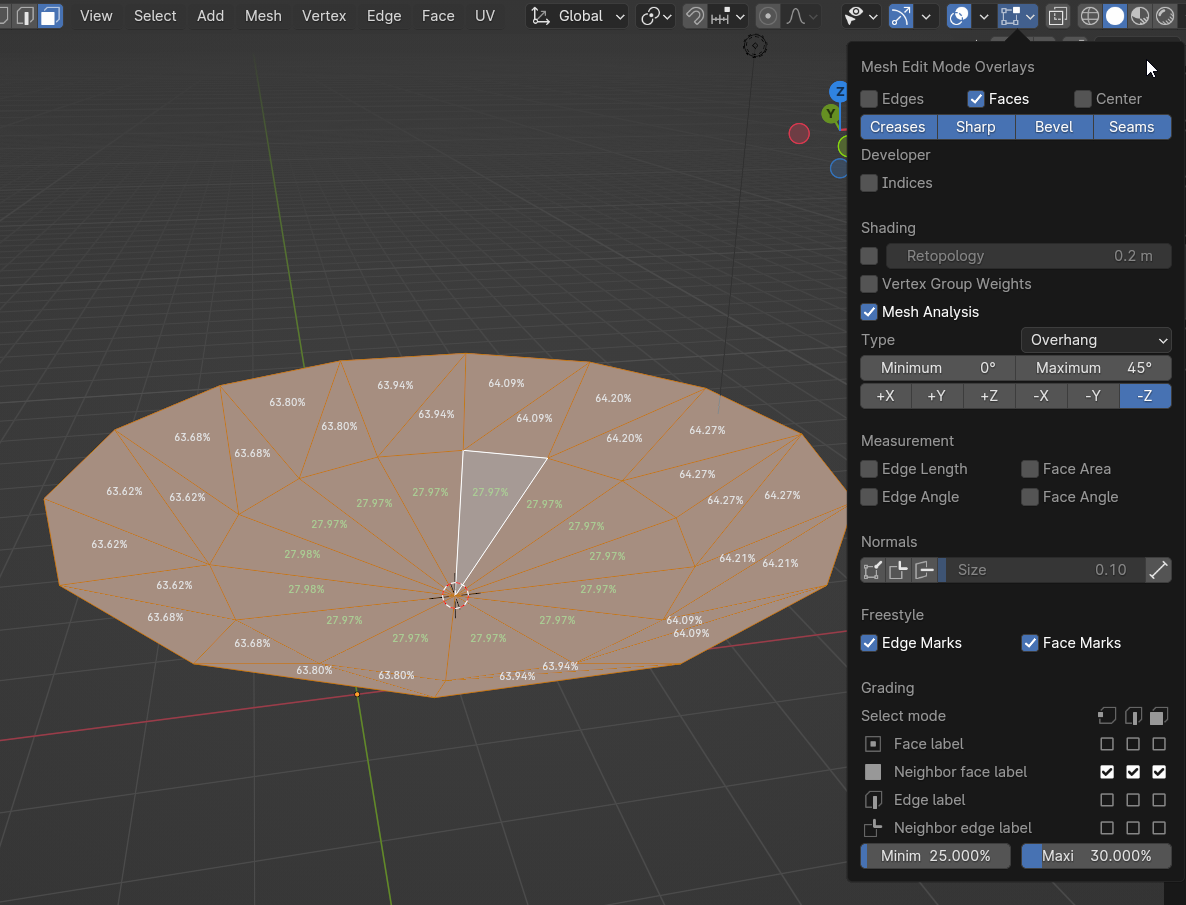
I am however considering something exposing something that would add a custom
Mesh analysis
Type
to be added to the dropdown, which would render add-on's custom UI config just below (as it currently does for the other analysis types).
Ultimately the add-on would pass
MeshStatVis
back a
RGBA
color for each face, where the add-on developer can configure color as well as opacity based on whatever property of the face they want to highlight, anything from materials to geometry, color vertex groups, etc.
This would probably byte into performance, maybe just a scalar from
0
to
1
for
color_A
to
color_B
, along with opacity scalar would work for most use cases? Any community thoughts on something like this?
1 Comment
projects.blender.org/blender/blender/pulls/112152