
Directly select the mesh in edit mode.
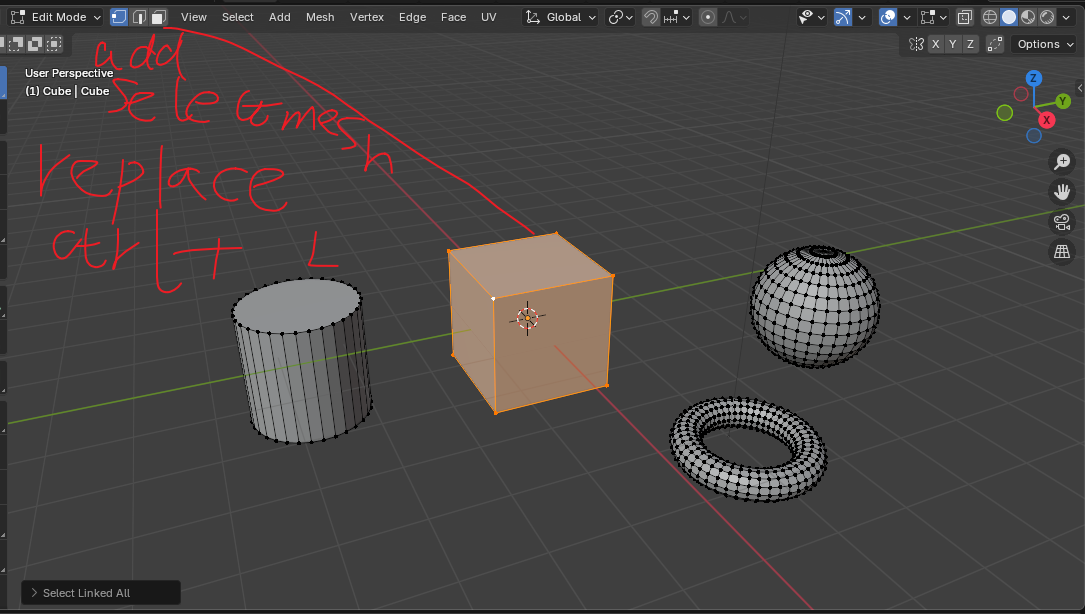
Well, I found that many people didn't understand what I said.which may be related to the title I chose.Of course, I know that pressing ctrl+L can select an object in edit mode, but I don't want to use ctrl+L frequently to select objects in edit mode. Pressing A doesn't work either, because that would select all the objects in edit mode. I want to be able to select one object at a time in edit mode, similar to the point, edge, and face modes in edit mode. Wait for me to post a picture. Hello, I would like to make a suggestion. If you want to select the entire mesh in edit mode, you need to first select a point, edge or face, and then press ctrl+L. So, is it possible to select the entire mesh as a mode? In this way, when we click on the object, the entire mesh will be automatically selected, and there is no need to press ctrl+L.I find this very helpful for quick composition, as I can freely transform multiple objects in Edit Mode on one object, rather than having to split it up into multiple objects in Object Mode and then transform them. This also avoids the issue of changing the origin.I prefer to adjust each object roughly and then separate it into multiple objects in object mode, rather than having to separate it into multiple objects and then adjust them one by one, because some objects in the adjustment overshoot may not be deleted directly.Another thing is that we often extrude on the surface of a mesh object when we build it, so it is more convenient to adjust it in edit mode.
18 Comments
hover the cursor over the mesh and press "L"
Yes, I know this works, but I don't want to press ctrl+L frequently. I want to use a selection mesh mode instead of pressing ctrl+L frequently.
not ctrl+L, just L alone whilst hovering over a mesh, when you hover over a mesh and press L, it automatically selects the island, you dont need to select part of it then ctrl L
Thank you, thank you. Actually, I think I should know to press L when hovering, but I have formed the habit of pressing ctrl+L now, and this habit can't be changed for a while.
L or ⎈ Ctrl L are for selecting linked mesh components (mesh shells). If you want to select "the entire mesh", that would be A as in "select all".
No, you didn't understand what I meant. I know that pressing ctrl+l can select a mesh, but what I'm suggesting is that instead of constantly pressing ctrl+L, you can add a mode that allows you to directly select an entire mesh, just like the point, edge, and face modes in edit mode.
If several people don’t understand your proposal, that’s proof it needs clarification. Right now your wording mixes up some different Blender concepts. For example:
⎈ Ctrl L does not select objects or "an entire mesh". It selects one mesh island (aka shell). If a mesh has three islands, you’d need to do it three times.
Example with Suzanne which is made out of multiple mesh shells, using that operator would give you this:
L with the mouse hovering is enough to select an island, no need to preselect a vertex/edge/face and then press ⎈ Ctrl L .
A selects all the mesh currently available in Edit Mode.
So I see two possible interpretations of what you ask:
A dedicated island/shell selection mode in Edit Mode (like UV Editor’s island mode). This already has an existing RCS proposal you can support: Edit mode - Island selection mode — Right-Click Select
A way to quickly select the entire mesh of each object even while in multi-object Edit Mode (so you can move multiple objects as if in Object Mode, but still inside Edit Mode).
Can you clarify which of these you’re proposing?
If it’s (1), then there’s already a proposal for an Edit-mode island/shell selection mode. In that case, it’s better to push that one by upvoting and commenting. RCS works a bit like a petition: many people supporting a single clear proposal makes it visible and shows the devs the idea has real traction. If everyone keeps posting new duplicates (often with less detail or less clarity), the support just gets diluted, and none of them reach enough attention.
If it’s (2), then your current post should be edited to explain that clearly, so people don’t confuse it with island selection. That way the discussion stays on-topic and the proposal has a real chance of being considered.
Yes, yes, the term mesh island is correct. sorry I didn't describe it correctly .But I think if 1 is done, then 2 must be no problem! I feel that having multiple sub-objects in an object and entering multiple objects in edit mode are similar?
There’s no such thing as sub-objects inside an object 🙂 Editing a mesh with multiple islands ≠ editing multiple mesh objects.
Objects are points in space (with location, rotation, scale) that can hold a datablock (mesh, text, armature, etc.).
A mesh datablock may or may not have multiple disconnected islands, but they’re just different parts of the same mesh.
Multi-object edit mode means you’re editing multiple datablocks at once, not “sub-objects” inside one.
For more details, see: Scenes & Objects » Objects » Introduction — Blender Manual
In other words, in my eyes, it is one function, but in the eyes of technicians, it is two functions? Let me think about it.
You can use the UV Editor and do Shift+G -> Object to select everything sharing the same object as a workaround for now.
This would be cool as an add-on. It is a nice time saver when you need it, but probably doesn't make a lot of sense in Vanilla because mesh islands are not technically its own thing/data in Blender
But I really want this feature, starry eyes! I think this feature will be more convenient!
Hi, I think this is on the roadmap but until then I suggest something like this: imgur.com/a/PtQBLe0 Way faster and direct than other methods.
Sorry, I can't open it. Really? It's on the roadmap.
new link imgur.com/a/PtQBLe0
Hello, I don't really understand. Um? Is there difference between this and ctrl +L?
Well for me it's faster and more convenient than 3dsmax where I have dedicated island mode selection plus no need to search L and the other ctrl, I already have the modifers at fingertips so just need a click. So less strain.
In combination with seams limit in the options it's very quick to select UV islands for unwraping work.