
Render Resolution then a Output Resolution
So what if we have an option to set our render resolution to 6K and then add a new resolution output option where it will scale the final image down to 4K to maintain more detail and better simulate how cameras work alongside somewhat boosting render times by reducing sample amount. Users that try to accurately simulate anamorphic lenses can also use the final image resolution as a unsqueezer. Generally this is so that if the user has edited their movie and is the last of their pipeline the movie can be exported at its final resolution and can be uploaded to streaming platforms.
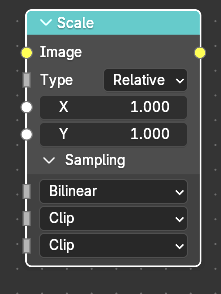
For the aspect settings and other things options to add how the image scaled could be pretty much the same as the scale node in the compositer. Adding stuff like streach, fit, crop, and so on and so fourth alongside adding the sampling method like nearest neighbor or Bicubic.
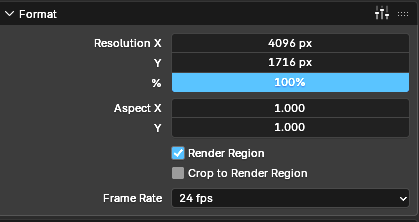
The user can type in whatever resolution or ratio they want as the final image. Pretty much the exact same menu as the in the Format section within the output properties.
2 Comments
There are many ways of doing this already. The VSE, or even just a Compositor node.
Soon there won't be need for going to the Compositor for adding effects, that'd be even easier.
To clarify if the project is finalized and can be rendered at a high resolution then exporting at its final resolution. I tend to do all of my VFX, rendering, and other pipeline stuff within one file to save time and space unless I have to do multiple different scenes. Hence why I always update a custom Startup file. I felt that having an output resolution would be easiest especially since if you are combining multiple different rendered scenes, The higher resolution the more laggy it is even with proxies, and if you shrink the resolution down it will lead to a more compressed final image look and it will consume more time having to reduce all scenes resolution individually. Yes I do have a powerful system but maybe this feature would be great for most.
Also in the compositor when you scale down images it will output as a small image in the middle. Yes you could scale that image back up with bilinear or nearest neighbor but that is rather unnecessary since the image will still output at the render resolution just with a much lower quality.
Hopefully that is clear to you.