
Helpful Curve Editor Update
Small user interface update that would make your life easier when editing any curves, for example RPG curves. e
-
Allow box selecting multiple points so that you can move them all together.
-
Allow removing points with alt + left click. This could make the editor much more user friendly, because first selecting the point and then clicking the x button is slow.
-
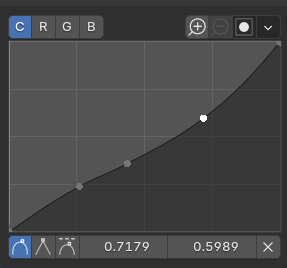
Make selected point somehow more visible. I don't know is this just default theme, but the selected and not selected points are really close in color. They shouldn't be like that. Instead you should be able to clearly see which dot is selected.
-
Allow scaling and rotating selected points with S and R keys when mouse is over the editor.
In this mockup I just made the not selected points little bit darker so that it's more visible which one is selected.
2 Comments
Holding ⎈ Ctrl while clicking is most often used as a specific selection action, not an element deletion.
I suspect that would lead to more unwanted deletion than anything. Using ⌦ Delete or X would be less ambiguous and coherent with the current keymap.
Or maybe ⎇ Alt drag, similar to how Node Wrangler uses it do remove a node from a noodle without breaking connection, except it would then delete the curve point on release.
That makes sense, I will update this.