
Copy Property Keyframe to Selected
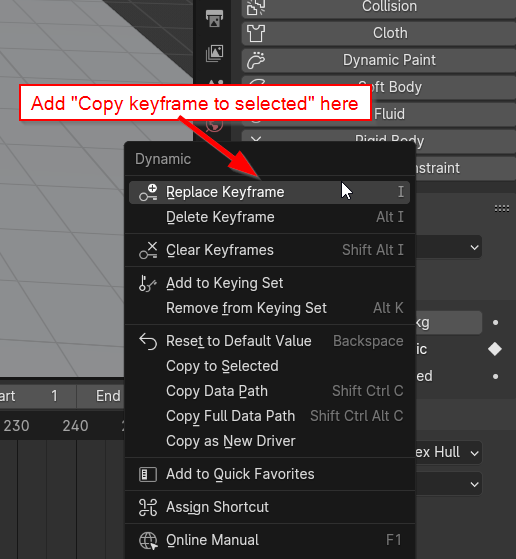
When multiple items are selected, clicking on a property control that has a keyframe will display a menu including keyframe options.
Can we please have an additional option here that copies this keyframe to any other selected objects that have this property available.
Specific use case: Dynamic participation in Rigid Body physics.
In general, any use case where there are a large number of objects that currently need to be keyframed by hand.
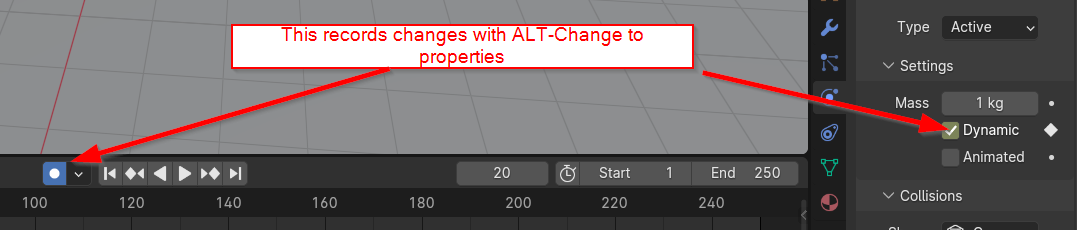
Alternative approach : Currently holding ALT while setting a property, copies that setting to the same property on all selected objects. If the Record Keyframes button is on, this should also set a keyframe on all the selected objects, for this property.
7 Comments
I'm also trying to keyframe Dynamic option for fracture simulation haha. I tried to find a workaround but couldn't. Hope they will implement it soon.
I think it would be intuitive to be able to click the dot on the right to "Dynamic" while holding Alt to set keyframes for all the objects selected since Alt+Enter can change a property of multiple objects.
Just realized I can use "Link animation data" in Object tab. It worked.
you might want to look into custom keying sets. They are under Scene->Keying Sets You can add a random selection of various objects to it that will get keyed all at once when pressing
IThanks for the post. I looked into your suggestion. I tried using keysets, I really did, but trying to manage a cell fractured objects, and staggering keyframing a number of them to Rigid Body Active at a time was utterly confusing and ridiculous. Just wanted to go to a frame, select a bunch of fragments and keyframe the Active box to True. sigh .
Don't you mean "paste" to selection?
As long as it works 😁 However, the right click menu on the property has a "Copy to selected" option (Pictured above) so "Copy keyframe to selected" would be consistent.
Blender isn't the best with grammar and terminology, that's certain.