
Exclude objects from mist pass
All objects show up in the mist pass, even if they are transparent or volumetric. This can cause multiple issues. For example, transparent windows have no mist behind them since Blender treats them as a solid object near the camera. Volumetric materials make the mist pass very noisy.
The current work-around is to render the mist pass separately, either as a stand-alone file or as a render pass. This can make rendering very slow, especially when working with heavy animation files.
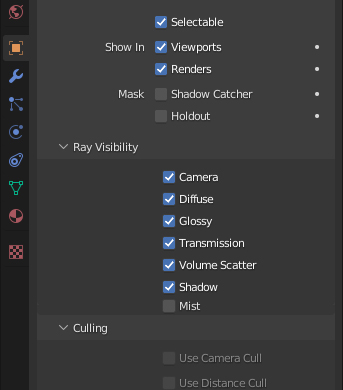
My proposal is a simple toggle box in the ray visibility panel to remove the object from the mist pass.
4 Comments
It would be great having that. Great suggestion.
Bump. Necessary feature for having a vector pass while volume object is in front of the camera. :)
can you specific which version of blender are you using plz, mine 3.0 seem doesn't have mist checkbox. ty
This is a feature suggestion, it's not in any version right now