
Grease pencil layer mask modes
This feature would allow to calculate different layer masks through addition, subtraction (top mask layer minus layers below), intersection (where they do overlap) or exclusion (where they don't overlap). Kind of like the shape tools you find in Inkscape in order to combine shapes:
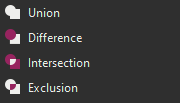
Currently, the way masks work, they are only additive. Which means that if I add two masks to a layer, the layer will be visible wherever the two masks are present.This presents some inconveniences when in certain situations. Lets say, for instance, that we have a head, an eye, and an iris.I want the iris to only be visible within the eye. I want the eye to be visible only within the head.
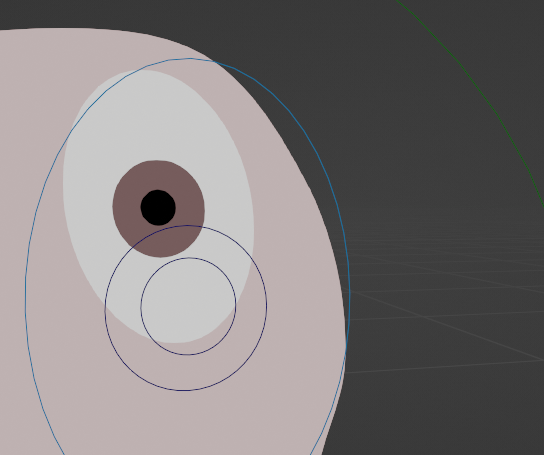
So I mask the iris with the eye, and the eye with the head. Simple, right? The problem is, when the eye leaves the head, the iris still remains visible... This is because the iris is still within the eye, even if we can't see it.
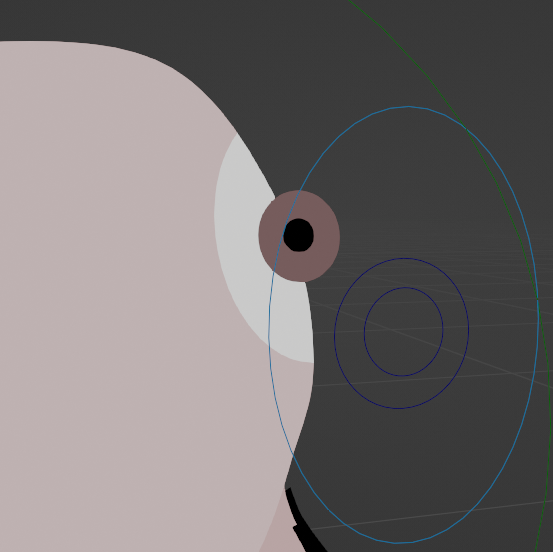
If I use the head to create a second mask on the iris, nothing changes... This is because the head mask and the eye mask are added together.
What I would want in this situation is to have the iris only visible where the masks overlap. So what would be amazing is to have an option to choose from that would tell you how the final mask is going to be calculated. It could look something like this:
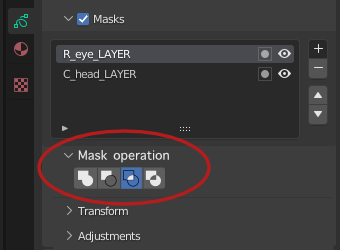
I am aware that I can put the face layer on top, mask it with the inverse of the eyes, mask the eyes with the face, and then mask the iris with the face, and that this will give me the result I am looking for. However:
-1 : this method is very counter intuitive. It took a while for me to find this solution, and I only found it thanks to forums.
-2 : when dealing with more layers, this means that an additional mask needs to be created each time for the face as well as the additional layer. It makes it more tedious to set up, and harder to keep track of your masking, since it needs to happen in two different places.
-3 : this new system would give a lot more flexibility to layer masking, and generate a whole new set of creative possibilities.
6 Comments
The only way that i can see this happening successfully is when GP is in its 2D mode and not is 3D mode.
Both these modes are kind of tucked away. It would be good to expose them to be more like 2D and 3D Curves.
This simple suggestion touches on a great opportunity to consolidate another part of Blender .ie Masking and Roto Tools, that should tie in the RT compositor.
Yeah I like the sound of this, I currently have some linework that I have partially masked out by another (inverted) layer, and I want to use the resultant shape to mask something else- but can't. It sounds like I could achieve it this way by taking the linework mask and subtracting the other
i recomand this, hardly needed , but let's think through it in profound. let's say we have mask "A" then mask "B" and then mask "C" in the list . let's note a mask operation by "#" :
(eg, for diffence, (A \ B) \ C ,i see that :A \ ( B u C) give same result and quicker, because we will substract (B n C) two times, in the first formula, but the secand one time only maybe i am wrong ) note , (A \ B) \ C != A \ (B \ C).
in general i like the feature
for second question ,my idea is to define mask operator for every mask, and that operate on result of masks above in the list of masks described by [ (A#B) *C ... ] relation (# and * are mask operator ).
for i UI, the icone to enable the mask in formulation or act as defautl can be after invert icon . and mask operators as defined as in your the picure
As to your first question, [(A#B) #C ] is indeed what I had in mind. As to your second comment, having a mask operator per mask layer actually sounds like a great idea. In order for it to work, each layer would indeed have to calculate its result based off of the results of the layers above. So, let's say we have layers A, B and C. The A layer doesn't have any mode because it's the first layer. The B layer has the addition mode. And the C layer has the intersection mode. This would mean that A and B are added first. We then calculate the intersection between the AB result and the C layer, which then gives us our final mask.
exactly, one point to mention will need a preview for in the mask list on each layers to now what mask operation has. maybe adding the ability to toggle among those operation masks is more better