
Simplify the tool's transform orientation option
Right now, if you need to change a tool's transform orientation, you have three places to do it:
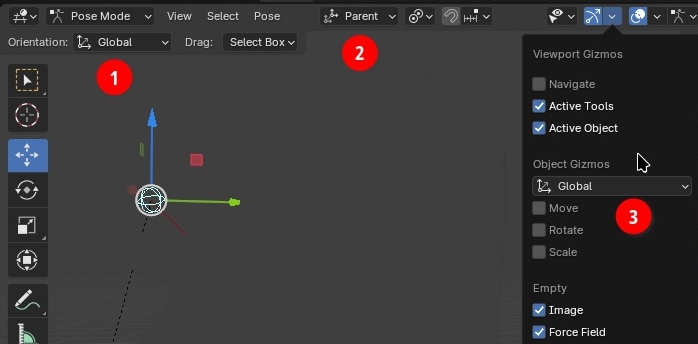
-
Current tool's orientation. Affects only the current tool, allowing you for example to have the Move tool set to
Parentand the Rotate tool set toGimbal, very useful for animators for example. -
"Scene" orientation. Affects any tool whose own transform orientation (see above point) is set to
Default. - " Object Gizmo ' orientation ". It's for the gizmo that is shown only when using some specific tools that don't have a location/rotation/scale gizmo to begin with. So for example, if you want to annotate things on the viewport, you can still have your gizmos ready to use at the same time!
What is the user experience here?
Imagine being a first time user. You have three seemingly identical options, that do very different things and will definitely confuse no matter if you happen to use the right one in the first place. What can a new user understand when seeing the "default" orientation?
You can always say that the user needs to learn, and having to learn isn't an issue. But if you can make tools that are intuitive enough to be used without having to read a manual, you make the experience better for everyone.
Imagine an experienced user, you understand what those are. You git it! But you still have all this clutter under your eyes and need to remember the differences. You have to walk across the entire viewport to play with them.
I am no software designer, but I personally think we should always keep things simple to read, understand and use. Without losing in functionality, but earning in productivity. Can we do that here? I think at least for the first case, we can.
Scene vs tool orientation
Having a way to share orientation across tools or have specific orientations for each tool is useful for many people. Can this be simplified?
I propose:
-
keep the two "scene" and "tool" orientations under the hood
-
remove the tool-specific popover
-
add a "share" checkbox in the scene orientation popover:
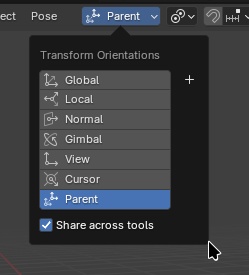
-
When checked on, function as if every tool orientation was using the scene's orientation.
-
When unchecked, every tool for himself, and the popover shows whatever the tool's orientation is.
-
Ideally, Blender remembers each tool's orientation. That way the
Shareis just a toggle but doesn't permanently loses your tools' orientations if you changed them. -
Optionally, for better user-discoverability, the default tools' orientations could be set to different ones to better showcase how the system works.
This way, you have only one unique place to look up for orientations. No more walking across the whole editor to do the same thing, no more confusion about having two different sets or orientations, you just chose whether you use the same orientation for all tools or not. And it's only one click .
Object Gizmo System
To be honest, I find this "object gizmo" system overly complicated and unnecessary. At least, if there are interesting features about this system, I feel they are either not clearly polished enough or completely made uninteresting by other things.
Firstly, the discoverability is... Horrendous? Who can guess from the GUI alone what this thing is? Even by just trying to use it and see what it does, you are more likely to not see it in action. Because it only works on certain specific tools, and requires to also enable at least one of the three checkboxes underneath it.
Even the manual isn't clear about what it is and what it can do:
Object Gizmos allow mouse-controlled translation, rotation and scaling in the 3D Viewport. While they’re called “object” gizmos in the popover, they also apply to other transformable elements such as mesh vertices.
It's just the definition of any regular gizmo! At no point the GUI nor manual ever hints the crucial parts:
- it's an optional additional gizmo to be added on top another one
- only a few specific other tools can work with it
- you can combine move/rotate/scale at will
And when you do understand all that, you still have quite some issues with it:
- it doesn't work by default! You need to change the orientation, pick the right tool, AND enable at least one of the three Move/Rotate/Scale.
-
which tools does it work with?
Just for fun, this is the tools that do work with it in mesh edition: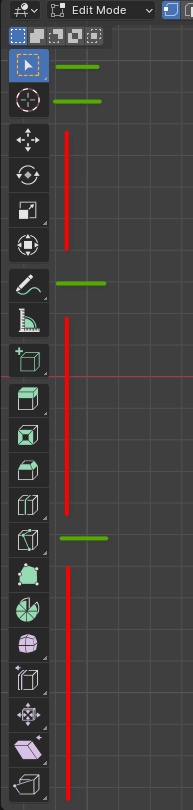
- when it does work, it's clunky to use because your tool does other things as well
- who needs to annotage and have a transform gizmo at the same time?
-
when you don't need it anymore, you have four ways to disable it: change the orientation to default, unchek the Move/Rotate/Scale, uncheck
Active Object, or disable the whole gizmo overlay.
I get that people might want to transform objects while using other tools, but is that the solution? It's so clunky to both understand and use that I don't see any reasy why anyone would prefer using this over just changing tools for a second, or using the drag action popover on the few tools that allow it:
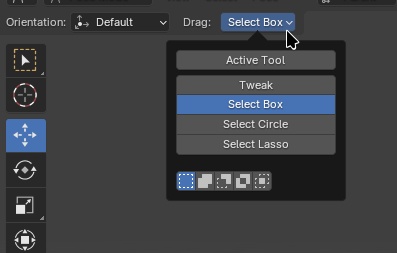
The only real advantage I see in this system, is being able to have a customized transform gizmo. If you don't like the full fledged Transform tool that does move/rotate/scale, you can use this system to have for example only move/rotate.
So to summarize, what this tool brings on the table is being able to move/rotate/scale while using some other tools, and having a custom transform tool. Can we make this simpler, intuitive and powerful?
I am less confident in the solutions here, but I will still throw in a few ideas:
- Add these options in the Transform tool:
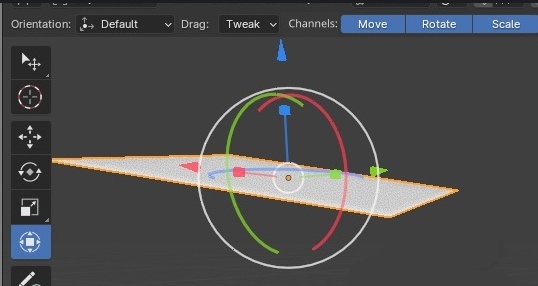 2. Allow combining multiple tools by
⇧ Shift
clicking them:
2. Allow combining multiple tools by
⇧ Shift
clicking them:
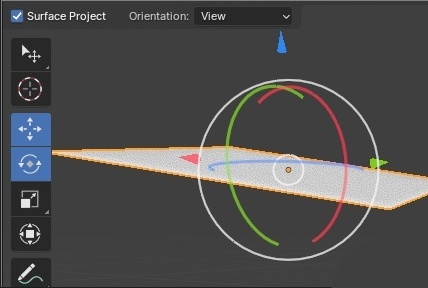
If there are some limitations, like some tools not usable with some others, maybe gray them out when holding shift to visually tell which tools can't be combined with the current one.
0 Comments