
Join Editor Areas using CTRL + click-and-drag
Problem: Clicking buttons called Join Left/Join Right or Join Up/Join Down feels unintuitive and takes an unnecessary moment for the brain to pause and process (especially when joining many areas).
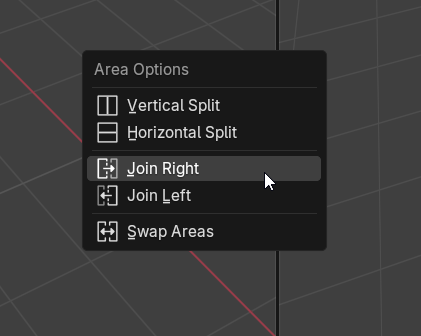
Feature suggestion: Add a feature where CTRL can be held down to click-and-drag, with the behavior of the intuitive Area Join from 4.2 and earlier:
UI suggestion: Instead of the mouse turning into an arrow when joining, it could display a delete icon for the area that is about to be joined.
UX suggestion: Using the hotkey would behave like current pie menus, so it would be CTRL down → mouse click (hold) → drag towards the Area you wish to remove → release mouse click = Area joined.
Non-intrusive: Adding a hotkey for this old behavior would be completely non-intrusive to the existing button clicking in 4.3, but would introduce a more intuitive and faster way to join areas.
3 Comments
The reason for this change is because join now does much more than just merge left/right or up/down but can also dock (move the area somewhere else).
For ultimate speed without using the corner zones, use a shortcut instead. Right-click on any area header and then right-click on "Move/Split Area" in the context menu. Add a custom shortcut. Now you can split, merge, and dock with a single keypress and a move of your mouse.
Why not drag any editor corner if you want a fast and intuitive solution?
Depending on the monitor scale / resolution / mouse DPI, the corners get to small and it's hard to click and drag.
So a menu it's something a little more consistent since it can be activated in any place of a window division and don't require any system changes like reduce mouse DPI or waste some time trying to get the corner click.
Less options it's almost always good, so a single join / split that allow users to select left right and up and bottom it's simpler and a little faster.
But considering that it's possible to save custom tabs and join or split areas are not a deal, since it's not something used all the time, like move objects and things like. I can't say the actual way is a problem.