
Proposed Feature: Add 'Make Group' option for collections
Current Issue:
A few people coming from other programs like Maya have been asking for an option to create groups of objects so they can be more easily transformed as one piece. The current work around is just parenting every object to an empty but this requires you to find and select the empty each time you want to manipulate the children objects. This becomes difficult if your intended 'group' has a lot of objects in it and since the empty's location is treated as the origin for the 'Group,' it might be well hidden inside of other objects that you don't want to select individually.
Proposed Solution:
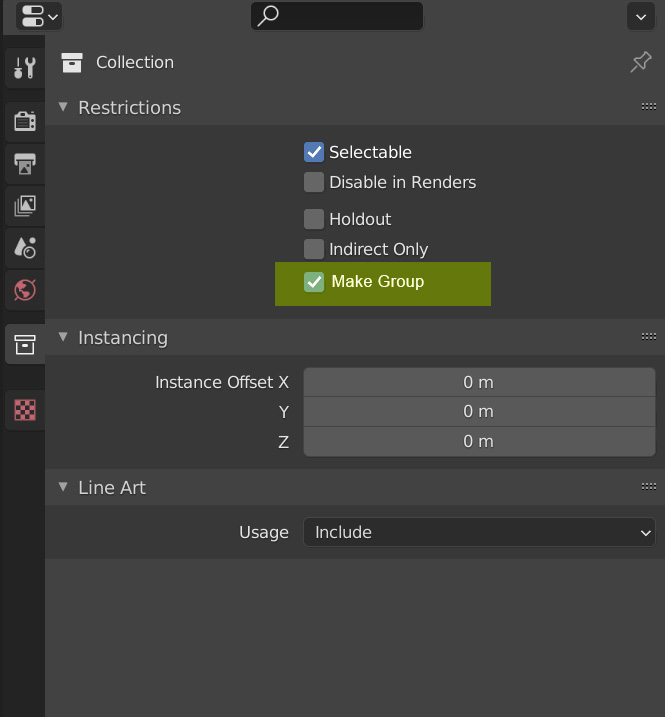
My proposal does away with this workaround by adding a "Make Group" tick box as an option in the collection properties tab -- see the attached image below. By ticking that box, everything inside that collection becomes a sort of 'Collection Instance' which allows users to select everything inside that collection just by selecting one object within that collection. No more empties, no more parenting! Just select any visible pieces of that collection and now everything within that collection is selected as one.
6 Comments
The "Quick Instances (Groups)" build in add-on might serve you well. Activate it. Ctrl+G = group selected objects, tab to edit the group. The groups are instanced throughout the scene.
* @vangel * around this is problem with edit collection, that required go to Lib scene.
A bit on the confusion about collections and groups: rendereverything.com/blender-groups-confusion-about-collections/
I think you are better off simply disabling the collection and making collection instance objects to do the in scene work in your scene.
* @zorro.weaver * That just replaces one step with two steps and it also doubles the number of collections inside your outliner.
Imagine managing 10 or more instances. If you want to make a minor change to an instanced collection, you'll have to activate the hidden collection, make your change, and turn it off each time.
With my proposal, you would only need to tick that check box to make it an (instance) group. If you want to make a change inside the collection, just untick that box and make the changes. A shortcut key could be used to speed up switching between the group and non-group mode.
We spent some time about this with @thinsolider, and exist some plugin to grouping Working with external files as components
You touching point as "Goup" like "Join" but without merge, and not parenting, etc. Thats have sense.
There is other problem.. when want edit Collection, you must find "main". By link and others I forcing the
Componentlike one sketchup.Even if here Group will be created, then soemthing like empty is required to boxing this and give for origin.