
Add Global Preference for Color Picker Default Mode (Linear/Perceptual)
Feature Request: Global Preference for Color Picker Default Mode
1. The Issue
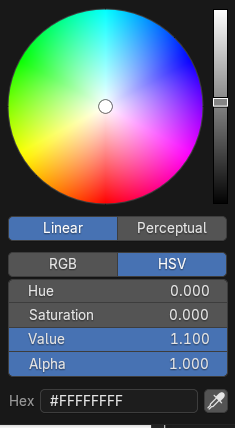
In Blender 5.0, the color picker was updated to include a switch between Linear and Perceptual modes. This is a great feature for flexibility. However, professionals working strictly within a physically-based rendering (PBR) and linear color pipeline require the color inputs to be in Linear mode by default to ensure numerical accuracy and consistency.
2. Current Behavior
The color picker defaults to Perceptual mode every time a new color property is opened.
- When a user manually switches to Linear mode, this setting is either not saved or not respected when opening a different color picker instance (e.g., another material's base color).
- Users must manually click Linear every single time they want to input a numerically precise color, which significantly slows down the linear workflow.
3. Proposed Solution
Please add a dedicated global preference setting to control the default state of the color picker slider mode.
-
Location:
Edit>Preferences>Interface - New Option: Color Picker Default Mode
-
Choices:
Linear(Default for PBR/Numerical Users) andPerceptual(Default for Artistic/Visual Users).
4. Justification (Why it's necessary)
For color-critical tasks (especially working with textures, light intensity values, and accurate material data), defaulting to Perceptual introduces unnecessary friction and potential for error, as the user might accidentally input a perceptual value where a linear value is expected. A global toggle would greatly enhance the quality-of-life for all professionals who mandate a linear workflow.
(Please note: I have included a screenshot of the new color picker UI to illustrate the Linear/Perceptual toggle.)
0 Comments