
Linking CUDA/OPTIX/OPEN CL render properties to general properties
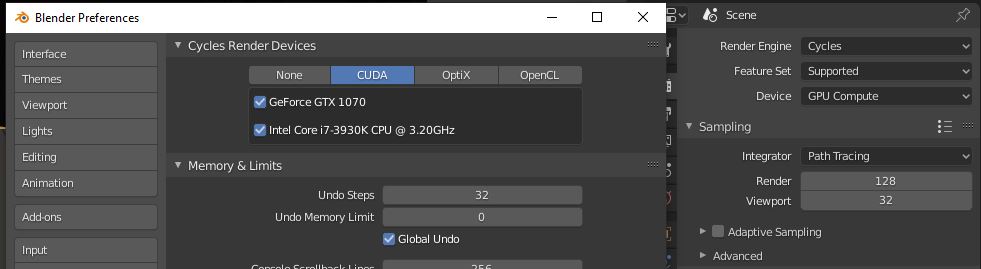
Why not make a link between render properties on the side panel with general properties. If you have GPU supporting Cuda, Optix or open CL it would be able to choose the device as GPU/GPU compute in render properties and general properties would automatically change to enable it so you don't have to go to properties and enable it in the first place.
Other ideas would be to run a test when instaling a new blender and check if there is a supported GPU and enable it by default.
Personally I would like just skip this step when I download a new version of blender especially on daily builds but for a new user, it could be a nightmare to figure out why his GPU doesn't work.
4 Comments
in Blender Global Setting are separate from Scene or Viewport setting, AFAIK untill will not change rules of Blender UI this should be not possible to do and this change will introduce one
inconsistencyon Blender UI* @NiCapp * Indeed.
But why choosing which technology or device to use should be a system option in the first place ? It's the same level of the already-existing device setting.
Leaving this to the scene options also unlocks the ability to have different functionalities, different hardwares, ... On a scene basis.
* @-L0Lock- * because is one Blender rule, save in .blend file hardware specific setting is not one good idea, scene and viewlayers setting are saved in .blend file at saving time, global setting are stored in preferences folder locally on PC.
I can think, for example, that a user who shares OpenCL settings in a .blend file and this file is open in Optix compatible PC but not OpenCL, what Blender should do?
How Blender will know if PC is CUDA capable or not if general setting are stored in .blend saved file?
It will do the exact same thing as when you click the CUDA option in the current user preferences when your pc isn't compatible. Still no issue here.