
Preventing "Save Incremental" from second-handedly destroying days of work
Save Incremental's convenience is all about one-click action, no questions asked, which works really well most of the time. But this lack of user input is detrimental in one specific case
If you use it on a file you just recovered from autosave, it saves the new version to the same "Temp" folder. "Temp" folder is often getting cleaned both automatically by the system and manually by user, and there is no reason to save new files here unless we want them to be banished to Tartarus
Furthermore, often when we open files we worked on recently, we open them from the "Open Recent". This way we don't even know where the file is unless we deliberately go out of our way to check it
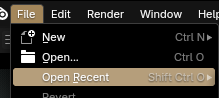
Now imagine opening the "Temp" file from here, working on it, and saving a new version through the same "Save Incremental". Do that a couple of times, and now many days of your work are all stored in a place unsafe from occasional extinction
That's not a common occasion of course, but if you use both "Save Incremental" and autosave, it is going to happen to you eventually. And unlike with other means of losing files, .blend1 backups and autosaves are getting deleted too as all that will be in the "Temp" folder
When working on a file in the "Temp" folder, we should either have a warning or have the "Save Incremental" open file manager suggesting a new saving location
5 Comments
Would this help? It should result in your second suggestion of having "Save Incremental" open file manager suggesting a new saving location for unnamed autosave files.
projects.blender.org/blender/blender/pulls/138351
Hey, thanks a lot for taking notice and working on it!
The issue described in the post seems to be different from what I thought it was
I'll write a comment under the pull
Hi. Looks specific, but I agree. I have another, specific issue, that seems a relatable example of the current limitations of the Save Incremantal Operator: in which, it is likely it could benefit from user specifications, on-demand.
Here is the case:
When dealing with an Asset Library Workflow, eventually we might get to Open, work, and the progressively Save Incremental, more than once, a .blend File which path/directory location is inside/conforming to an assigned Asset Library path (from the Preferences), as this is how to enable some of the fundamental Asset Library functionalities.
However, I've realised that what we end up getting, by having multiple Incrementally-Saved .blend Files on that directory, is that it creates 'Duplicates' ('clones') the original Assets; and these 'Duplicates' will keep showing (as extra Assets) in the Asset Library (inside Blender when we check its Area for the Assets' Thumbnails), and this is pretty confusing ans will keep happening, as long as we keep the Incrementally-Saved .blend Files in that crucial directory. One workaround would be to clean up the (real) folder eventually, either by deleting the older Incrementals or by moving them outside (e.g., to a WIP folder for the project, a folder that cannot be inside the assigned Asset Library directory). But this frustrating as a Worfklow: because the prupose of the "Save Incremental" Operator is exactly to spare project time, and by just 1 click drop an 'Incremental-24' inside the 'right location'. It's ok when we have to clean up a normal folder later on; but it is asbolutely not ok, when that folder is an assigned Asset Library folder!!! (because then, there will be this VERY MESSY 'cloned' Assets appearance.
So, for revision: This sounds a pretty simple problem, but this poses an annoying Workflow problem, because if someone is working on a .blend File which IS one of the File containers of Assets for the Asset Library of that project, that means that such File should be in the assigned Asset Library directory (in order to work properly), but then, this also means if we are working on it, we CANNOT rely (very much) on the Save Incremental Operator for easy Backups (of simpler projects Worfklows), as this will NOT automatically Move those Incrementally-Saved Files to a WIP folder (outside of the assigned Asset Library directory).
I don't know yet a proper solution to this. But all I know is that the Save Incremental Operator current doesn't provide any facility for Asset Library Workflows. What I needed, was that an Operator could "Save Incremental", and at the same time, "Move" the previous Incremental File into a different directory (indicated by the user): in principle, a Non-Library Asset one; while the latest Incrementally-Saved .blend File, will remain in the Asset Library directory --in this way, there would be no Copies/Duplicates/'Clones' of Assets, and no complicated/time-consuming managerial back-and-forth Worfklow to handle, and the Save Incremental Operator (or a slightly different Operator) would retain 'the 1-click solution for a problem'.
Maybe, an Warning: 'Attention, User! You are about to Save Incremental .blend File inside an Asset Library folder! This will cause (reversible) 'cloning' of the Assets if you keep those Files in that folder... Do you wish to proceed?'
Perhaps it would be easier to code, manage and understand if it's persented as an option in the Asset Library to show assets only from the last file version? It does deserve it's own post
It's actually a good example on why an idea of introducing a special case for "temp" directory might introduce special handling for other directories and I don't think it ever stops. Usually special cases end up not being special enough.
But I have a solution for your particular case - you can use symlinks. What symlink is, it's a direct link to file located in other folder. E.g. you'll have a folder "Project", where you have asset.blend you're going to work on. While you will be working on it, it will keep creating incremental copies in "Project" folder. If you want to add this file to your assets (let's say all assets located in "Assets" folder), you can create a symlink from "Assets/asset.blend" to "Project/asset.blend". So Blender will see it an asset (and may never know that this file is actually pointing elsewhere) and you can continue working on it as "Project/asset.blend" without ever introducing unnecessary copies to assets.
If you're working on Windows, "Link Shell Extension" is extremely useful to create those kind of symlinks - schinagl.priv.at/nt/hardlinkshellext/linkshellextension.html