
Changing Editor type faster
Hi! This is my proposal: Improving the editor switching speed.
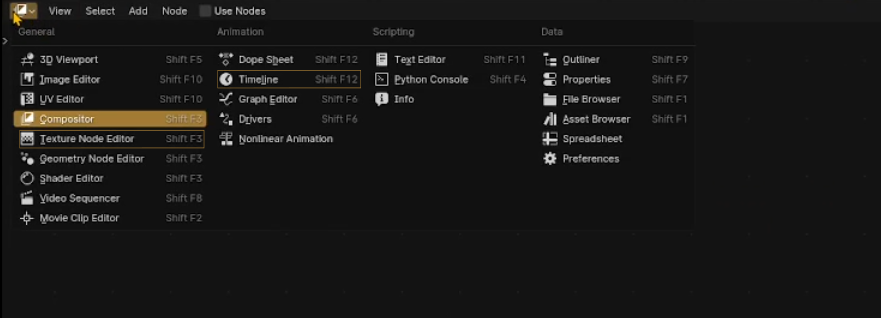
When you click on the icon to change the editor window (e.g., from the Timeline to the Shader Editor), instead of manually selecting it, you can press "S" to go directly to the Shader Editor. This feature already exists, and I use it a lot because it’s faster. I also use it for the Asset Browser.
However, if I want to switch to the Timeline, pressing "T" doesn’t work because it takes me to the Texture Node Editor instead. To solve this, I have two proposals:
- A simplified search-based selection:
Similar to the modifier search bar but more streamlined. If you type "T," for example, it highlights editors that start with "T," such as the Timeline and Texture Node Editor. If the next letter is "i," the editor change directlty to Timeline; if it’s "m" (instead of i), you go directly to the Image Editor. This logic would apply to all editors with similar names.
- Improved shortcuts:
Currently, switching editors using Shift + number shortcuts doesn’t feel intuitive. Instead, it would be more logical to use the first letter of the editor’s name. If multiple editors start with the same letter, Shift + the second letter (or another logical combination) could be used.
- Additionally, I think users should be able to customize editor shortcuts. Right now, when I right-click to change a shortcut, the "Assign Shortcut" option isn’t available.
I know this is a small change, but I switch my editor panel so frequently during my Blender sessions that it would be a huge time saver—especially after 10 hours of work when my eyes are too tired to search for options, haha.
I’d love to hear your thoughts on this. Thank you!
1 Comment
Maybe a pie menu should be added for quick navigation to all editors. The current shortcuts are spread across many different buttons, and it might be helpful to group them into one command.
I remember maya could cram over two dozen commands into a pie menu, I wonder if blender can support pie menus with more than 8 buttons?