
Geo Nodes UI: Colorize True/False when displaying boolean text using viewer
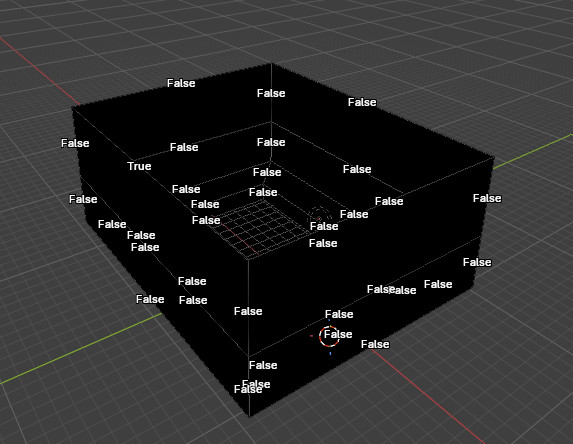
If you use a viewer node to display text for boolean values, currently the text is displayed as white with a black outline. This is true whether the value is true or false.
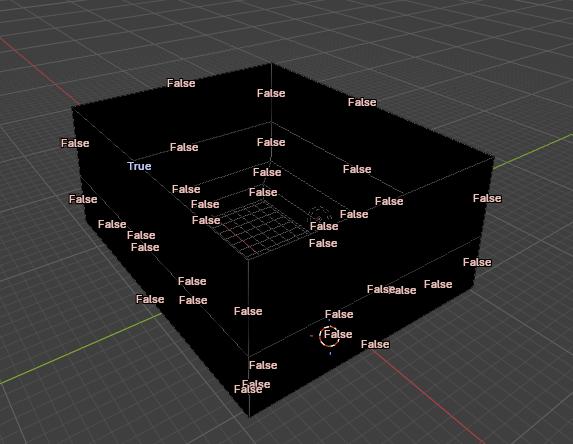
This makes it extremely difficult to see where the values are true, and where the values are false. I propose that values that are True would be displayed as one color. And values that are false are displayed as a different color.
(I would not select green and red in the case that someone who is colorblind might not be able to discern the actual differences. I selected red and blue, but I am not an expert on color blindness so better colors could and probably should be used).
The first image shows how it is currently (and this is a simple model). The second shows my proposal.
2 Comments
Marking as Done! It will be part of Blender 5.3
Thanks for the idea!
Good idea! I made a PR to test this. At the moment it's using green/red so users can test it. It doesn't change the default theme colors, tweaking "Success" and "Error" colors is possible via the theme for users that need more contrast.
projects.blender.org/blender/blender/pulls/164383